
AEM Ninja Chrome 插件, crx 扩展下载
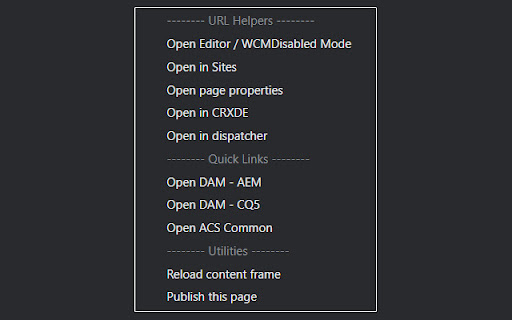

Open various AEM pages faster so you can focus your task, increasing productivity.
Default shortcut key:
Open current page in Editor Mode or WCM-Disabled Mode: Alt + Shift + D
Open current page in Sites: Alt + Shift + S
Open page properties in new tab: Alt + Shift + P
Open current page in CRXDE: Alt + Shift + C
More features coming in the near future!
~~~~~~~~~~~~~~~~~~~~~~~~~~~~~~~~
Changelog:
## v0.2
- Internally reworked how mapping URL settings are stored, It is now future-proof but you will need to key in your previous domain-to-crx mappings again.
- Settings now take effect immediately instead of having to reload the browser.
- Added author to dispatcher URL mapping. This will only affect the "Open Editor / WCMDisabled Mode" command.
- Added quick link function in context menu: Open DAM page and ACS Common page for current domain.
- Added a utility function in context menu: Publish current page.
## v0.1
- First release.
| 分类 | 📝工作流程与规划 |
| 插件标识 | kgncmdbhoojodangibmkfgipljjenphp |
| 平台 | Chrome |
| 评分 |
☆☆☆☆☆
|
| 评分人数 | |
| 插件主页 | https://chromewebstore.google.com/detail/aem-ninja/kgncmdbhoojodangibmkfgipljjenphp |
| 版本号 | 25.2.3.0 |
| 大小 | 19.17KiB |
| 官网下载次数 | 32 |
| 下载地址 | |
| 更新时间 | 2020-07-06 00:00:00 |
CRX扩展文件安装方法
第1步: 打开Chrome浏览器的扩展程序
第2步:
在地址栏输入: chrome://extensions/
第3步: 开启右上角的【开发者模式】
第4步: 重启Chrome浏览器 (重要操作)
第5步: 重新打开扩展程序管理界面
第6步: 将下载的crx文件直接拖入页面完成安装
注意:请确保使用最新版本的Chrome浏览器