
Plurk Savior Chrome 插件, crx 扩展下载
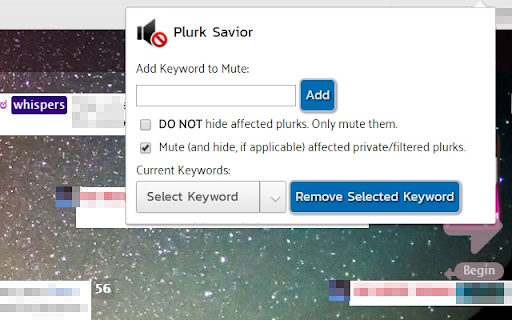
Automatically mute and hide plurks on your timeline based on keywords.
Are you tired of seeing plurks on your dashboard about certain topics? Tired of constantly muting them? With Plurk Savior, you can input keywords, and any plurk - aside from your own - with said word in the top level will automatically be muted and hidden from your view. This can also work with emotes and icons, provided you enter the image's URL as a keyword.
This is based on the old Plurk Mute-and-Hide extension by Francis Chong.
| 分类 | 👥社交 |
| 插件标识 | kgohcolckgjlahpbhoocahejhpcbbdnj |
| 平台 | Chrome |
| 评分 |
☆☆☆☆☆
|
| 评分人数 | |
| 插件主页 | https://chromewebstore.google.com/detail/plurk-savior/kgohcolckgjlahpbhoocahejhpcbbdnj |
| 版本号 | 3.128.4 |
| 大小 | 273KiB |
| 官网下载次数 | 567 |
| 下载地址 | |
| 更新时间 | 2022-07-25 00:00:00 |
CRX扩展文件安装方法
第1步: 打开Chrome浏览器的扩展程序
第2步:
在地址栏输入: chrome://extensions/
第3步: 开启右上角的【开发者模式】
第4步: 重启Chrome浏览器 (重要操作)
第5步: 重新打开扩展程序管理界面
第6步: 将下载的crx文件直接拖入页面完成安装
注意:请确保使用最新版本的Chrome浏览器