
Sync Sofa - Online Video Synchronizer Chrome 插件, crx 扩展下载


This extension allows multi-user sync streaming video in a fast, simple and stable way.
Sync Sofa is a full stack web extension support a easy-to-use and stable way to synchronize streaming playback for multiple users. It can improve the experience when users from different locations want to share a video/movie remotely. Currently, the features include:
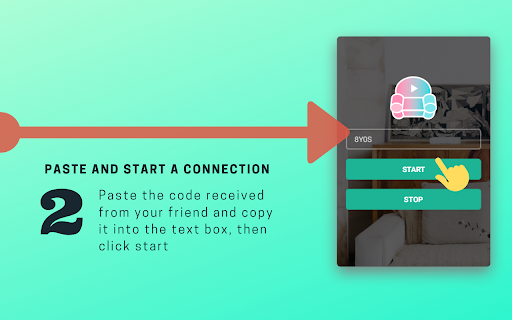
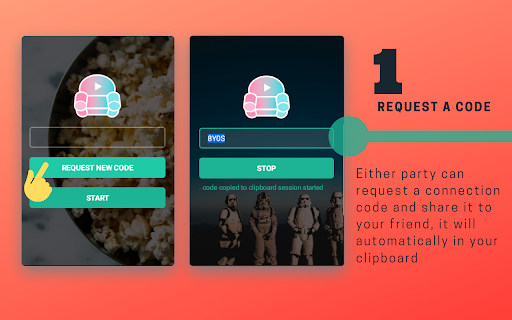
- peer connection: either party can be the host of a sync room and the other can join with connection code.
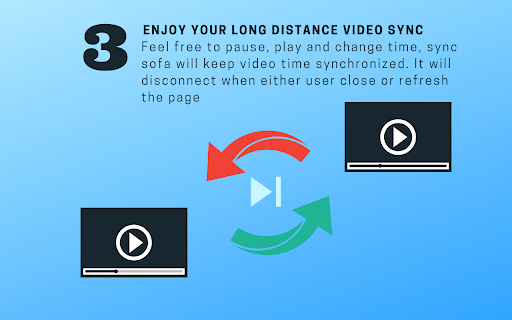
- sync pause/play: each user pause/play/seek the video, the other side will do the same
- sync play process bar control: the playing time change will also affect other side user
- local video sync: provide two ways to sync your playing of local video file
- built-in instant chat & video conference call: can discuss with peer use the built-in instant chat & video call
Sync Sofa是一个稳定易用的Chrome浏览器拓展插件,可同步两端用户的视频播放操作,提高与身处异地的小伙伴一同观看视频的体验,目前支持以下主要功能:
平等双人连接:任意一端均可控制对方播放状态
同步播放进度:支持播放、暂停、进度切换等操作
本地视频同步:可通过VLC同步本地视频播放状态
文字视频通讯:可在观看时与同伴保持交流
Supporting sites:
? 油管
? 哔哩哔哩
? 爱奇艺
? 优酷
? 腾讯微云
? 腾讯视频
? 芒果TV
? 学堂在线
? 西瓜视频
? A站
? Local mp4 file via Browser
? Local video file via VLC media player
(More will comes soon, full support list see: https://onns.xyz/sync-sofa/#supported-list )
Development version is here: https://chrome.google.com/webstore/detail/sync-sofa-online-video-sy/nlmcbcmdllaihacbnjngiegimonkdgll
? latest version - update on 02 Feb 2021 - v1.0.10
⚠️⚠️⚠️ ALL SOURCE CODE can be found on https://github.com/LouisYLWang/Sync-Sofa, ENJOY Video Calling and don't worry we won't gather anything from you.
? Add:
0. Built-in video call feature
1. Add multiple supporting sites
✅Fix:
0. Fix bug about close connection, now you can reconnect immediately without refreshing current page.(Auto reconnect will be coming soon~)
1. Improve UI logic
2. Fix bug about video buffering.
3. Fix bug of no new bugs
Release History:
v1.0.9
? update on 14 Aug 2020
⚠️⚠️⚠️ Each website has it's own controller of the playback rate, so please ignore the wrong display of playback rate.
Add:
playback rate sync: any side user's change to the playback rate will sync to the other side.
Fix:
Fix bug of no new bugs
v1.0.8
? update on 8 Aug 2020
⚠️⚠️⚠️ Do Not try to use Room code like 0000 or 1234, We strongly recommend you use uncommon code so that you do not need to change it.
Add:
allow customized connection code, user can directly connect to peer simply click the start button, without reapplying a new code
simple built-in chat feature (can be toggled in options page)
add system notification (can be toggled in options page)
add connection status budge to extension icon (red-unconnected, yellow-pending connection, green-connecting)
add a notification for unknown socket disconcerting
add duplicate connection code notification
Fix:
Fix bug of no new bugs
? 新增:
0. 视频通话功能
1. 增加支持(芒果TV国际版,爱奇艺国际版,西瓜视频,A站,完整列表请访问主页https://onns.xyz/sync-sofa/#supported-list)
✅修复:
0. 修改断开连接逻辑 - 你可以在断开连接后立即重新连接,无需刷新网页
1. 修改界面逻辑 - 修复了全屏播放视频时文字聊天弹窗被遮挡的问题
2. 修复视频缓存处理逻辑
3. 修复了没有bug的bug
历史更新:
v1.0.9 - 2020年8月14日更新
⚠️⚠️⚠️ 每个网站都有它自己的倍速控件,所以请忽略前端的错误播放速度显示。
新增:
播放速率同步功能:任意端用户对播放速率的调整会自动同步至另一端
修复:
修复了没有bug的bug
v1.0.8 - 2020年8月8日更新
⚠️⚠️⚠️ 请不要尝试使用像0000和1234这样简单的房间码,我们强烈建议你使用不常见的房间码,这样就不必频繁更改它。
新增:
修改房间申请码逻辑,用户可自行输入房间码,且下次连接时无需重新申请,只需点击start按钮即可快速连接(!房间码须为四位小写字母+数字的组合)
增加内置文字聊天(可在配置页面切换)
增加系统通知选项(可在配置页面切换)
增加连接状态指示灯,显示在插件图标右下角(红-未连接,黄-等待对方连接,绿-正在连接)
增加socket断开因未知原因断开通知
增加房间码占用通知
修复:
修复了没有bug的bug
| 分类 | 🎉趣味休闲 |
| 插件标识 | kgpnhgmpijhpkefpddoehhminpfiddmg |
| 平台 | Chrome |
| 评分 |
☆☆☆☆☆
|
| 评分人数 | |
| 插件主页 | https://chromewebstore.google.com/detail/sync-sofa-online-video-sy/kgpnhgmpijhpkefpddoehhminpfiddmg |
| 版本号 | 1.0.10 |
| 大小 | 5.97MiB |
| 官网下载次数 | 6000 |
| 下载地址 | |
| 更新时间 | 2020-08-14 00:00:00 |
CRX扩展文件安装方法
第1步: 打开Chrome浏览器的扩展程序
第2步:
在地址栏输入: chrome://extensions/
第3步: 开启右上角的【开发者模式】
第4步: 重启Chrome浏览器 (重要操作)
第5步: 重新打开扩展程序管理界面
第6步: 将下载的crx文件直接拖入页面完成安装
注意:请确保使用最新版本的Chrome浏览器