
MS Doc Link Chrome 插件, crx 扩展下载
Handle MS Office Document links in a better way
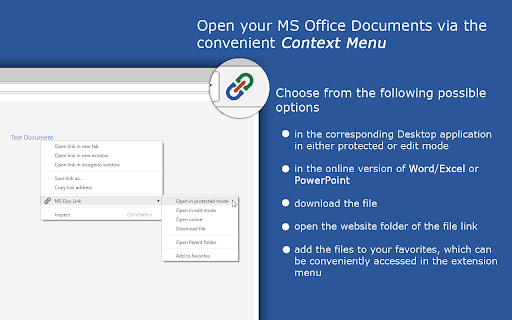
This Extension provides several options for handling/opening Microsoft Office Documents. In the default mode you can only open the documents via opening the context menu on a hyperlink on a web page, which points to either a Microsoft Word, Excel, PowerPoint or Visio file.
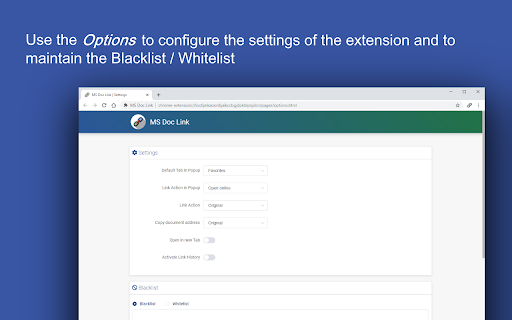
You can however use several other options via the Extension menu (click on the icon)
The usable options are the following:
=> activate a link history
Each time a document link is opened a history entry is created.
(The history can be accessed via the extension menu or via the context menu
action)
=> Choose a custom action for a left mouse click on a document link
- Open online
- Open in protected mode (Desktop application)
- Open in edit mode (Desktop application)
- Download file
- ...
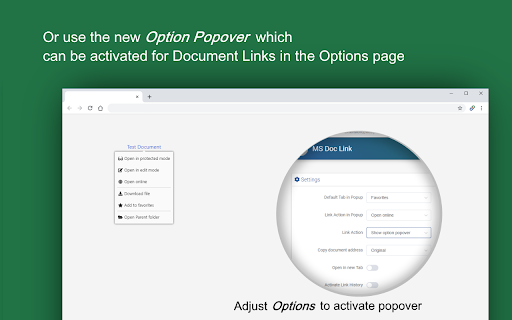
=> Choose a custom copy to clipboard action for the option popover, the extension menu and the history/favorites page
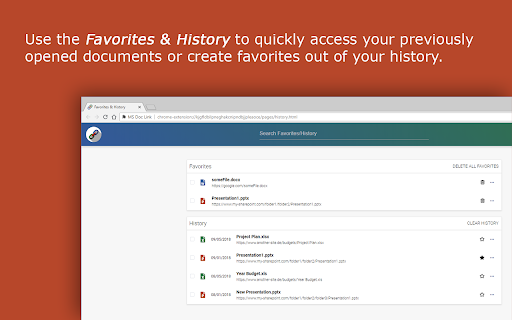
=> Create Favorites from your history
=> Access Favorites and your recent history (up to the last 20 entries)
Context Menu Actions on the page
--------------------------------
- Perform file action during click on office link
- Open favorites/history page (click somewhere on the page)
Context Menu Actions on the Extension Icon
-------------------------------------------
- Open favorites/history page
IMPORTANT NOTES:
- The extension settings are synced to your google account
- The history/favorites are only stored in the local storage of the browser
- The extension uses the Microsoft Office URI protocols for opening documents. Depending on web server where the file is stored, this may or may not work. The extension was designed primarily for the use in Microsoft SharePoint sites, but may also work elsewhere
Supported Document formats:
--------------------------------------
- Word: *.doc, *.docx, *.docm
- Excel: *.xls, *.xlsx, *.xlsm, *.xlsb, *.csv
- PowerPoint: *.ppt, *.pptx, *.pptm
- Visio: *.vsd, *.vsdx, *.vsdm, *.vssx, *.vssm, *.vstx, *.vstm
| 分类 | 📝工作流程与规划 |
| 插件标识 | khildacmciagghamickjajfmhcbnkjhp |
| 平台 | Chrome |
| 评分 |
☆☆☆☆☆
|
| 评分人数 | |
| 插件主页 | https://chromewebstore.google.com/detail/ms-doc-link/khildacmciagghamickjajfmhcbnkjhp |
| 版本号 | 25.2.3.0 |
| 大小 | 492KiB |
| 官网下载次数 | 3000 |
| 下载地址 | |
| 更新时间 | 2019-08-22 00:00:00 |
CRX扩展文件安装方法
第1步: 打开Chrome浏览器的扩展程序
第2步:
在地址栏输入: chrome://extensions/
第3步: 开启右上角的【开发者模式】
第4步: 重启Chrome浏览器 (重要操作)
第5步: 重新打开扩展程序管理界面
第6步: 将下载的crx文件直接拖入页面完成安装
注意:请确保使用最新版本的Chrome浏览器