
GitHub folder download&zip Chrome 插件, crx 扩展下载
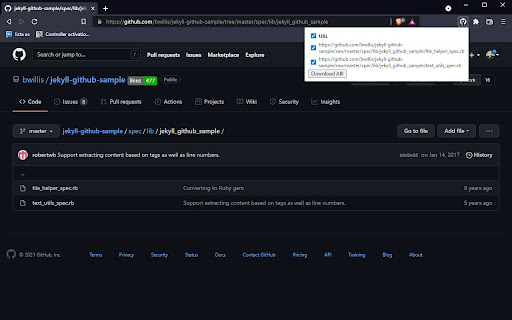
It works on a github subfolder page - zips all the direct descendant files in that subfolder
Github web ui allows downloading and zipping a whole repository but it does not allow doing that inside subfolders.
This plugin extends the github webpage UI so that it is possible to download and zip a subfolder.
It works by looking for all the links in that subfolder, fetching raw files from that links and compressing them into a single zip file.
Because all this can be done in the context of the logged in user, this can work seamlessly without needing to set up any authorization keys.
Known limitations:
- binary files are currently incorrectly zipped, because text() is read from fetch response
- only files from the top files are added to the zip (the files from subfolders are not)
| 分类 | 💻开发者工具 |
| 插件标识 | khnljpeameaeeadfbckchhhnchndfjnj |
| 平台 | Chrome |
| 评分 |
☆☆☆☆☆
|
| 评分人数 | |
| 插件主页 | https://chromewebstore.google.com/detail/github-folder-downloadzip/khnljpeameaeeadfbckchhhnchndfjnj |
| 版本号 | 0.13 |
| 大小 | 64.88KiB |
| 官网下载次数 | 170 |
| 下载地址 | |
| 更新时间 | 2023-05-16 00:00:00 |
CRX扩展文件安装方法
第1步: 打开Chrome浏览器的扩展程序
第2步:
在地址栏输入: chrome://extensions/
第3步: 开启右上角的【开发者模式】
第4步: 重启Chrome浏览器 (重要操作)
第5步: 重新打开扩展程序管理界面
第6步: 将下载的crx文件直接拖入页面完成安装
注意:请确保使用最新版本的Chrome浏览器