
Download video from facebook Chrome 插件, crx 扩展下载
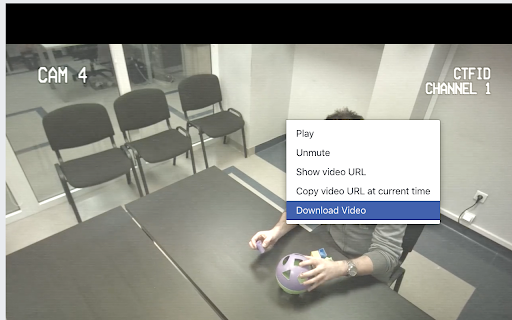
Chrome plugin that extends the facebook context menu and adds functionality for downloading the selected video element
IMPORTANT!
This extension only works with the classic Facebook look. If you are using the new Facebook layout you can use my newest plugin I wrote:
https://chrome.google.com/webstore/detail/video-downloader/pdgnickkolfaldghlnonpiefbokaecnb
How it works?
1. Click the right mouse button
2. Select the "Download Video" option
3. Wait for a moment and voila, the video is downloading
Remember
- After installing the extension, you should restart your browser or at least browser tab.
- When you are trying to download video from the "Watch" section, first you need to scroll down a bit to let the extension properly load. This only occurs on that page.
If you find any bugs, let me know by creating an issue in my GitHub repo
https://github.com/mdrazyk/download_video_fb_extension/issues
I will be happy to help you :)
Icons made by Pixel perfect from www.flaticon.com
| 分类 | 👥社交 |
| 插件标识 | kjjlfnmamiphaeamdngahedegooecnnc |
| 平台 | Chrome |
| 评分 |
☆☆☆☆☆
|
| 评分人数 | |
| 插件主页 | https://chromewebstore.google.com/detail/download-video-from-faceb/kjjlfnmamiphaeamdngahedegooecnnc |
| 版本号 | 1.0.3 |
| 大小 | 8.97KiB |
| 官网下载次数 | 2000 |
| 下载地址 | |
| 更新时间 | 2020-09-16 00:00:00 |
CRX扩展文件安装方法
第1步: 打开Chrome浏览器的扩展程序
第2步:
在地址栏输入: chrome://extensions/
第3步: 开启右上角的【开发者模式】
第4步: 重启Chrome浏览器 (重要操作)
第5步: 重新打开扩展程序管理界面
第6步: 将下载的crx文件直接拖入页面完成安装
注意:请确保使用最新版本的Chrome浏览器