
Table range select and copy like in Firefox! Chrome 插件, crx 扩展下载
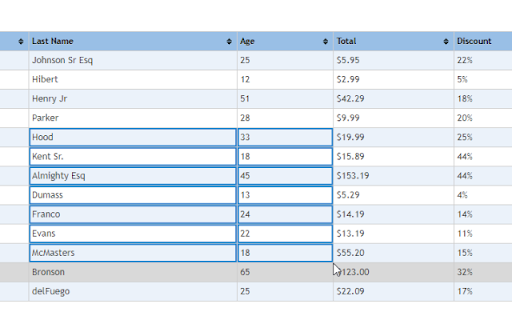
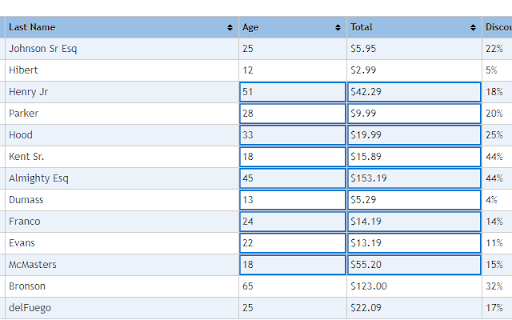
The extension enables table range selection like in Firefox!
Select table ranges with CTRL+mouse and select table cells with ALT+mouse click.
Release notes 1.5.16
- Ctrl + Mouse click for links fixed
Release notes 1.5:
- Alt + Click selects single cells.
- Ctrls + Click + move selects table ranges exactly like in Firefox.
Improvemets:
- Fast UI redraw
- Select Border now not moves tables
Please send your feedbacks to javlon[at]gmail.com
| 分类 | 📝工作流程与规划 |
| 插件标识 | klojbfbefcejadioohmnkhjmbmecfapg |
| 平台 | Chrome |
| 评分 |
☆☆☆☆☆
|
| 评分人数 | |
| 插件主页 | https://chromewebstore.google.com/detail/table-range-select-and-co/klojbfbefcejadioohmnkhjmbmecfapg |
| 版本号 | 25.2.3.0 |
| 大小 | 6.96KiB |
| 官网下载次数 | 8000 |
| 下载地址 | |
| 更新时间 | 2021-04-20 00:00:00 |
CRX扩展文件安装方法
第1步: 打开Chrome浏览器的扩展程序
第2步:
在地址栏输入: chrome://extensions/
第3步: 开启右上角的【开发者模式】
第4步: 重启Chrome浏览器 (重要操作)
第5步: 重新打开扩展程序管理界面
第6步: 将下载的crx文件直接拖入页面完成安装
注意:请确保使用最新版本的Chrome浏览器