
BigConsole Chrome 插件, crx 扩展下载
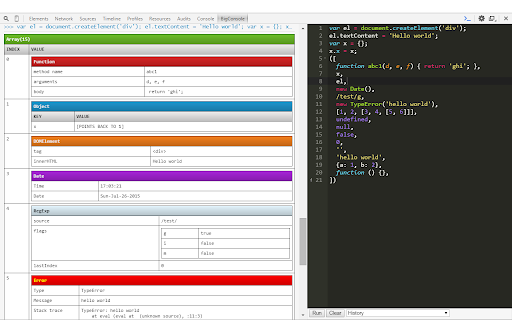
Adds a multiline JavaScript console to the Chrome developer tools.
NOTE: I do not plan to update this extension to Manifest V3, meaning it will no longer be compatible with Chrome 127+ (June 2024). Chrome Dev Tools' built-in Snippets editor has a lot of the same functionality (click the Sources pane, then choose Snippets in the left sidebar) if you also "Show console drawer" (hit Escape). It should be possible to get a horizontal layout using something like this: https://stackoverflow.com/a/16538221
----
Adds a panel to the Chrome Developer Tools that provides a multi-line split console, like in Firefox.
Includes:
- Vertical split style multiline REPL
- Syntax highlighting and nice editor things thanks to Ace Editor
- Pretty-printed output
- "Run" button or CTRL+Enter to execute code
- "Clear" button to clear REPL
- "History" drop-down to restore previously executed code
Compared to Chrome Dev Tools' built-in Snippets editor, BigConsole aims to help users iterate and try out code faster. Where Snippets is more like a light IDE, BigConsole is simpler and geared towards iterating on code as quickly as possible in a multiline, syntax-highlighted REPL.
The code is available at https://github.com/IceCreamYou/Chrome-BigConsole
| 分类 | 💻开发者工具 |
| 插件标识 | klommbdmeefgobphaflhmnieheipjajm |
| 平台 | Chrome |
| 评分 |
☆☆☆☆☆
|
| 评分人数 | |
| 插件主页 | https://chromewebstore.google.com/detail/bigconsole/klommbdmeefgobphaflhmnieheipjajm |
| 版本号 | 1.2.3 |
| 大小 | 2.32MiB |
| 官网下载次数 | 2000 |
| 下载地址 | |
| 更新时间 | 2023-12-06 00:00:00 |
CRX扩展文件安装方法
第1步: 打开Chrome浏览器的扩展程序
第2步:
在地址栏输入: chrome://extensions/
第3步: 开启右上角的【开发者模式】
第4步: 重启Chrome浏览器 (重要操作)
第5步: 重新打开扩展程序管理界面
第6步: 将下载的crx文件直接拖入页面完成安装
注意:请确保使用最新版本的Chrome浏览器