
Time-Travel Debugger for The Web Chrome 插件, crx 扩展下载
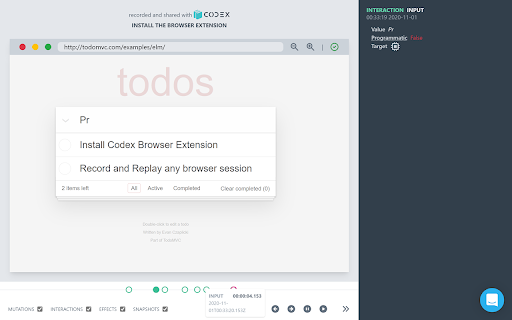
Record, Share & Replay the Web. Step through events, inspect the HTML and debug with confidence.
Debugging your web apps is hard. How many times have you asked someone testing your software what browser they were using? Exactly what URL they were on? Exactly what they typed, where they clicked, what they saw?
The Codex Recorder extension exists to make that all go away.
With a simple "record" button, you can track all the information about a browser session that you need to debug your app. Use it to generate a shareable link, with an event history that is easy to step through, details for each event, and an inspectable playback window.
| 分类 | 💻开发者工具 |
| 插件标识 | kmakeljcpchnojdlkdkefhjkakadccoh |
| 平台 | Chrome |
| 评分 |
☆☆☆☆☆
|
| 评分人数 | |
| 插件主页 | https://chromewebstore.google.com/detail/time-travel-debugger-for/kmakeljcpchnojdlkdkefhjkakadccoh |
| 版本号 | 2.2.2 |
| 大小 | 197KiB |
| 官网下载次数 | 32 |
| 下载地址 | |
| 更新时间 | 2021-05-13 00:00:00 |
CRX扩展文件安装方法
第1步: 打开Chrome浏览器的扩展程序
第2步:
在地址栏输入: chrome://extensions/
第3步: 开启右上角的【开发者模式】
第4步: 重启Chrome浏览器 (重要操作)
第5步: 重新打开扩展程序管理界面
第6步: 将下载的crx文件直接拖入页面完成安装
注意:请确保使用最新版本的Chrome浏览器