
Wikipedia Watchlist Chrome 插件, crx 扩展下载
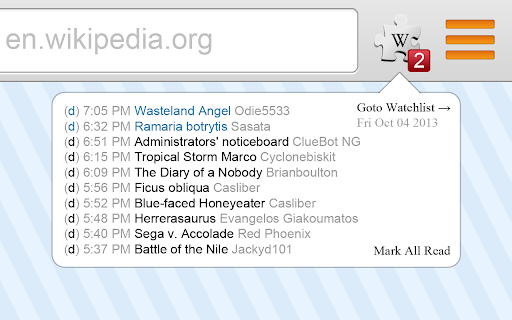
Checks a Wikipedia user's watchlist for updates.
Wikipedia Watchlist checks your watchlist and updates the badge on the browser action icon to reflect new changes. Clicking on the badge opens up a popup where you can highlight different changes to view their edit summaries. Clicking the little 'd' will take you to the last difference for the page and clicking the page name will take you to the page itself.
Comments are greatly appreciated. Please let me know what you think.
v1.2.0.3 2014-05-25 – Fixed bug where all article links are diffs.
v1.2.0.2 2013-12-28 – Fixed bug in localization of watchlist link.
v1.2.0.1 2013-10-04 – Added option to automatically mark changes as read after closing the popup.
v1.2.0.0 2013-10-04 – Fixed logged out bug. Added customizable update delay to the options page.
v1.1.0.2 2010-08-22 – Added options page with the ability to choose which language Wikipedia to watch.
v1.1.0.1 2010-08-17 – Fix pruning of old unreads. Made timestamp always visible.
| 分类 | 📰新闻与天气 |
| 插件标识 | kmfbnpoggnebafhbanelibhdpbkkncfe |
| 平台 | Chrome |
| 评分 |
☆☆☆☆☆
|
| 评分人数 | |
| 插件主页 | https://chromewebstore.google.com/detail/wikipedia-watchlist/kmfbnpoggnebafhbanelibhdpbkkncfe |
| 版本号 | 1.2.0.3 |
| 大小 | 366KiB |
| 官网下载次数 | 104 |
| 下载地址 | |
| 更新时间 | 2014-05-25 00:00:00 |
CRX扩展文件安装方法
第1步: 打开Chrome浏览器的扩展程序
第2步:
在地址栏输入: chrome://extensions/
第3步: 开启右上角的【开发者模式】
第4步: 重启Chrome浏览器 (重要操作)
第5步: 重新打开扩展程序管理界面
第6步: 将下载的crx文件直接拖入页面完成安装
注意:请确保使用最新版本的Chrome浏览器