
Cloudbleed Indicator Chrome 插件, crx 扩展下载
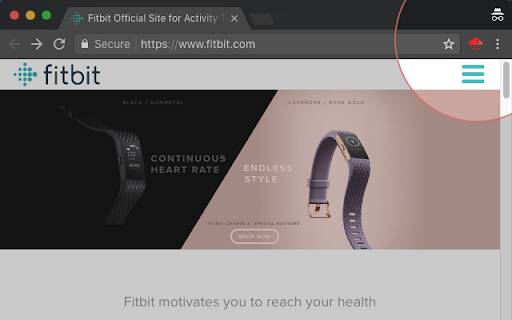


Test any page and see if it is using CloudFlare or not. Inspired by Feb 2017 Cloudbleed security incident.
Featured at Product Hunt: https://www.producthunt.com/posts/cloudbleed-indicator-for-chrome
Cloudbleed Indicator does not fix the issue, it recognises it using Google Public DNS (DNS-over-HTTPS).
If the cloud icon is bleeding, you might consider:
- changing your password,
- using 2-step verification (if available),
- leaving the site altogether.
Cloudbleed (also known as CloudLeak and CloudFlare Bug) is a security bug discovered on February 17, 2017 affecting Cloudflare's reverse proxies, which caused their edge servers to run past the end of a buffer and return memory that contained private information such as HTTP cookies, authentication tokens, HTTP POST bodies, and other sensitive data. Some of this data was cached by search engines.
| 分类 | 📝工作流程与规划 |
| 插件标识 | kpemamadacmlpafjkboflojhlhcjekli |
| 平台 | Chrome |
| 评分 |
☆☆☆☆☆
|
| 评分人数 | |
| 插件主页 | https://chromewebstore.google.com/detail/cloudbleed-indicator/kpemamadacmlpafjkboflojhlhcjekli |
| 版本号 | 25.2.3.0 |
| 大小 | 14.23KiB |
| 官网下载次数 | 142 |
| 下载地址 | |
| 更新时间 | 2017-02-27 00:00:00 |
CRX扩展文件安装方法
第1步: 打开Chrome浏览器的扩展程序
第2步:
在地址栏输入: chrome://extensions/
第3步: 开启右上角的【开发者模式】
第4步: 重启Chrome浏览器 (重要操作)
第5步: 重新打开扩展程序管理界面
第6步: 将下载的crx文件直接拖入页面完成安装
注意:请确保使用最新版本的Chrome浏览器