
Jira HotLinker Chrome 插件, crx 扩展下载
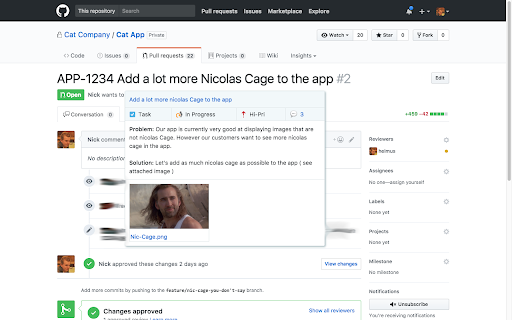
Jira HotLinker, quick access to Jira metadata when hovering over ticket numbers!
This extension will show a tooltip when hovering over a jira ticket number on github or a ticket link.
The tooltip is enabled on github.com by default, you can add new domains by clicking on the extension icon or in the option menu.
New ! :
- Copy past the ticket title to clipboard thanks to @ https://github.com/kaspars-ozols
- Github enterprise support for pull requests !
- Security updates
Features:
- Title and Link to Jira
- Related pull requests
- Descriptions
- Attachments
- Issue type / status / priority
- Comment count and plain text comments
- Configure domains where the plugin is active by clicking on the extension icon.
- Pin a ticket on the screen by dragging the title
Privacy Features:
- Does not store any user data what so ever
- Only requires access to the websites where you want to use the plugin.
- Does not ask for your jira password or user name !
Should also work on google docs all tough that is currently experimental.
| 分类 | 📝工作流程与规划 |
| 插件标识 | lbifpcpomdegljfpfhgfcjdabbeallhk |
| 平台 | Chrome |
| 评分 |
☆☆☆☆☆
|
| 评分人数 | |
| 插件主页 | https://chromewebstore.google.com/detail/jira-hotlinker/lbifpcpomdegljfpfhgfcjdabbeallhk |
| 版本号 | 25.2.3.0 |
| 大小 | 674KiB |
| 官网下载次数 | 1000 |
| 下载地址 | |
| 更新时间 | 2022-02-22 00:00:00 |
CRX扩展文件安装方法
第1步: 打开Chrome浏览器的扩展程序
第2步:
在地址栏输入: chrome://extensions/
第3步: 开启右上角的【开发者模式】
第4步: 重启Chrome浏览器 (重要操作)
第5步: 重新打开扩展程序管理界面
第6步: 将下载的crx文件直接拖入页面完成安装
注意:请确保使用最新版本的Chrome浏览器