
Salesforce Advanced Search Chrome 插件, crx 扩展下载

Salesforce Advanced Search Plugin
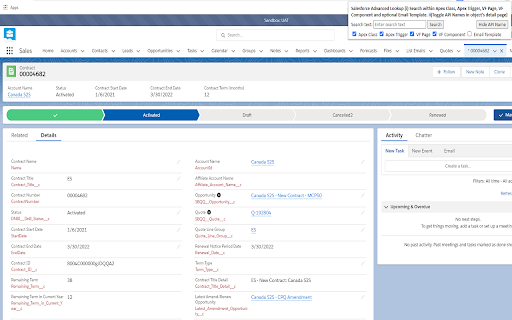
Salesforce Advanced Search plugin works in both Classic and Lightning:
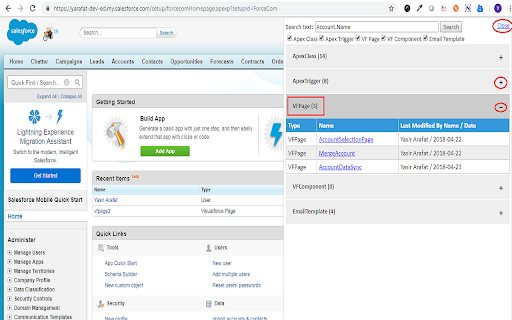
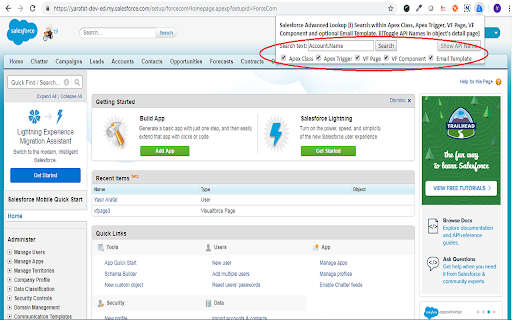
i) Search any keyword, text or field api name used anywhere in below Salesforce Components, in the result section plugin shows the total number of files where keyword has been used in different components. Plugin also provides to choose which all components to search in for the keyword via checkbox selection:
1) Apex Classes
2) Apex Triggers
3) Visualforce Pages
4) Visualforce Components
5) Email Templates
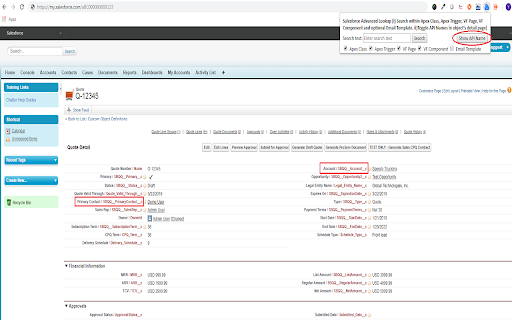
ii) Show Field API Names with Labels of an object in details page, you can toggle between Show and Hide Field API Names without refreshing the page
It's also available for Firefox: https://addons.mozilla.org/en-US/firefox/addon/salesforce-advanced-search/
| 分类 | 💻开发者工具 |
| 插件标识 | lbkpckaekpilejfambbkphfedniacanj |
| 平台 | Chrome |
| 评分 |
☆☆☆☆☆
|
| 评分人数 | |
| 插件主页 | https://chromewebstore.google.com/detail/salesforce-advanced-searc/lbkpckaekpilejfambbkphfedniacanj |
| 版本号 | 1.30.3 |
| 大小 | 25.05KiB |
| 官网下载次数 | 2000 |
| 下载地址 | |
| 更新时间 | 2021-01-12 00:00:00 |
CRX扩展文件安装方法
第1步: 打开Chrome浏览器的扩展程序
第2步:
在地址栏输入: chrome://extensions/
第3步: 开启右上角的【开发者模式】
第4步: 重启Chrome浏览器 (重要操作)
第5步: 重新打开扩展程序管理界面
第6步: 将下载的crx文件直接拖入页面完成安装
注意:请确保使用最新版本的Chrome浏览器