
oneclick-fontchanger Chrome 插件, crx 扩展下载
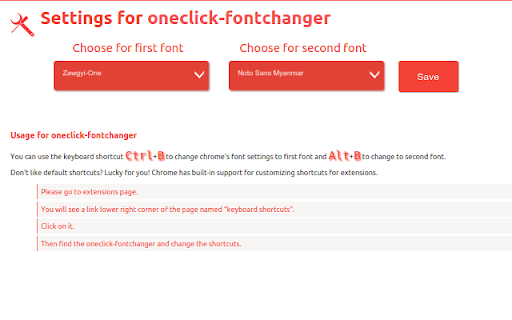
Let you switch between two fonts via keyboard shortcuts. For convnience,you can use 2 keyboard shortcuts.
A chrome extension that lets you switch between two fonts via keyboard shortcuts. For convnience,you can use 2 keyboard shortcuts(default Ctrl+B and Alt+B).
The extension was originally written to solve the problem of quickly changing between Zawgyi-One and Myanmar Unicode. But you can change to any two fonts via options.
Technical Detail: oneclick-fontchanger changes chrome font settings programmatically. It does/need not change the DOM of the page you are view. So there is almost no or little overhead involved. It works gracefully with facebook pages to which it was originally targeted.
The limitation of this extension is you need to have the fonts you want to change in your system(default settings assumed Zawgyi-One and Noto Sans Myanamar). Also since it does not convert the fonts, you will not see one font rendering correctly while using other font.(But the postualate the developer assumed is no one can look at two text simultaneously.)
So you can just switched to other font by pressing the shortcut for that font.
Note: For myanmar users who don't have Unicode font or Zawgyi Font. Here are some download links:
[Zawgyi One](http://zawgyi.googlecode.com/files/ZawgyiOne2008.ttf)
, [Noto Sans Myanmar](https://www.google.com/get/noto/pkgs/NotoSansMyanmar-unhinted.zip) from google
,[Other Myanmar Unicode Fonts](http://www.myanmarlanguage.org/unicode/myanmar-fonts-which-follow-unicode-rules)
| 分类 | ♿无障碍访问 |
| 插件标识 | lcibcnkknknmafeamdfcjlidodipfffe |
| 平台 | Chrome |
| 评分 |
☆☆☆☆☆
|
| 评分人数 | |
| 插件主页 | https://chromewebstore.google.com/detail/oneclick-fontchanger/lcibcnkknknmafeamdfcjlidodipfffe |
| 版本号 | 2.19.1 |
| 大小 | 55.62KiB |
| 官网下载次数 | 430 |
| 下载地址 | |
| 更新时间 | 2015-01-27 00:00:00 |
CRX扩展文件安装方法
第1步: 打开Chrome浏览器的扩展程序
第2步:
在地址栏输入: chrome://extensions/
第3步: 开启右上角的【开发者模式】
第4步: 重启Chrome浏览器 (重要操作)
第5步: 重新打开扩展程序管理界面
第6步: 将下载的crx文件直接拖入页面完成安装
注意:请确保使用最新版本的Chrome浏览器