
AsanaTabs Chrome 插件, crx 扩展下载
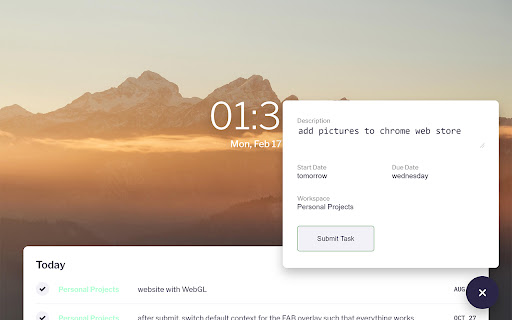
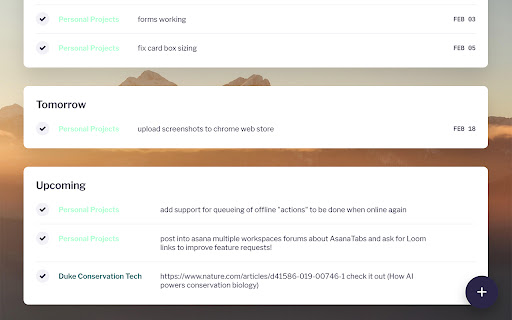
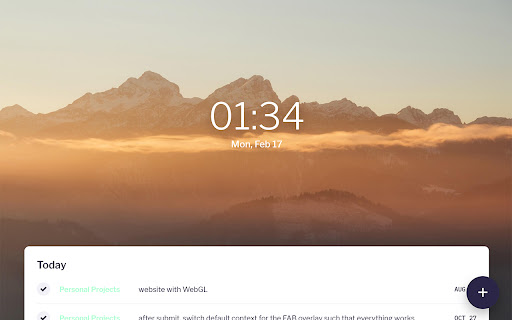
A lightweight, clean way to view tasks from across all your workspaces in your new tab page.
Asana Tab is an extension that allows users to overhaul their new tab page in order to view Asana projects from multiple workspaces in an easy-to-access and completed user interface.
For more information, please visit the Github page: https://github.com/kamesstory/asanatabs-react.
If you have any questions, please feel free to submit them via Github Issues: https://github.com/kamesstory/asanatabs-react/issues/new
v3.4.0 — Adding support for Cohere, to help debug issues and support users.
v3.3.0 — Adding support for querying through background script to enable tasks to update and actions to execute even when the tab is closed.
v3.2.0 — Corrections to timezones and allowing upcoming tasks to show up again.
v3.1.0 — Fixed several task submission issues and made the workspace selection a drop-down.
v3.0.0 — Touched up all parts of the app, including the create task button and animations on the task list
v2.2.0 — Added nav to Asana website on click of task
v2.1.2 — Added URL to be opened upon uninstall
v2.1.1 — Minified the background image so there is smoother loading
v2.1.0 — Added defaults for the workspaces, start and due dates!
v2.0.0 — Revolutionized everything! Now back and better. Cleaner and more modern design, and new framework for more and better changes in the future.
v1.5.2 — Added changes to accommodate for Asana API 'id' to 'gid' switch.
v1.5.1 — Changed "Mark Task Done" button scaling, and small display main page layout
v1.5.0 — Added feedback functionality and settings for local storage of workspaces that users don't want to see.
v1.4.1 — Modified tasks to not display extraneous "Date not defined" data.
v1.4 — Modified the header to get rid of the white split
v1.3 — Added full complete task and new task functionalities, and changed background (yet again)
v1.2.1 — Changed background photo for loading time optimization and laid foundation for discrete workspaces and workspace orderings.
v1.2 — Added am/pm displays, changed time to 12:00 settings instead of 24:00. Also added date and weekday in American format.
v1.1 — Added default display screen with ability to open a project view below the default screen
v1.0 — Initial Release, with minimum viewing functionality
| 分类 | ⚙️功能性 |
| 插件标识 | ldfaccjdcphlaodakclpiomadaakoobd |
| 平台 | Chrome |
| 评分 |
☆☆☆☆☆
|
| 评分人数 | |
| 插件主页 | https://chromewebstore.google.com/detail/asanatabs/ldfaccjdcphlaodakclpiomadaakoobd |
| 版本号 | 3.4.0 |
| 大小 | 620KiB |
| 官网下载次数 | 484 |
| 下载地址 | |
| 更新时间 | 2023-02-06 00:00:00 |
CRX扩展文件安装方法
第1步: 打开Chrome浏览器的扩展程序
第2步:
在地址栏输入: chrome://extensions/
第3步: 开启右上角的【开发者模式】
第4步: 重启Chrome浏览器 (重要操作)
第5步: 重新打开扩展程序管理界面
第6步: 将下载的crx文件直接拖入页面完成安装
注意:请确保使用最新版本的Chrome浏览器