
Helium Selectors Chrome 插件, crx 扩展下载
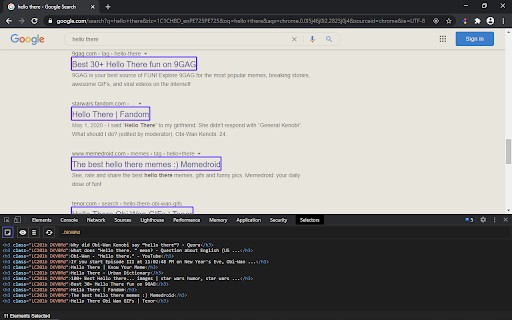
Generate CSS selectors from sample elements.
To use this extension, open up the developer tools and find the "Selectors" tab. Once opened, press "Enable Selection Mode", if not already enabled, and start selecting elements. The algorithm will attempt to find the most specific and shortest selector, so often you'll have to add many samples, or press "Select Similar Elements" until you get the selector you want. It also has a "Select Inspected Element" button that selects the currently inspected ($0) element so you can also add elements that are hidden or difficult to highlight with the mouse.
If you visit a page after creating a CSS selector and turn on selection mode, all matching elements will be highlighted and will be able to keep adding sample elements if needed. The extension will remember all the sample elements, so visiting new pages will often update the CSS selector to prevent selecting elements that haven't been used as samples, as the extension will always try to be as specific as possible. So for instance when creating a selector for a next button, it's usually a good idea to visit at least a couple of pages where the next button is (and add more samples if needed), and also the last page in case there is a disabled next button, so that the algorithm updates the selector to not select the disabled next button.
| 分类 | 💻开发者工具 |
| 插件标识 | lgmfgiimjdebhlmjmdipngklgfdffjip |
| 平台 | Chrome |
| 评分 |
☆☆☆☆☆
|
| 评分人数 | |
| 插件主页 | https://chromewebstore.google.com/detail/helium-selectors/lgmfgiimjdebhlmjmdipngklgfdffjip |
| 版本号 | 0.6.1 |
| 大小 | 57.16KiB |
| 官网下载次数 | 26 |
| 下载地址 | |
| 更新时间 | 2020-10-18 00:00:00 |
CRX扩展文件安装方法
第1步: 打开Chrome浏览器的扩展程序
第2步:
在地址栏输入: chrome://extensions/
第3步: 开启右上角的【开发者模式】
第4步: 重启Chrome浏览器 (重要操作)
第5步: 重新打开扩展程序管理界面
第6步: 将下载的crx文件直接拖入页面完成安装
注意:请确保使用最新版本的Chrome浏览器