
SMART4Solutions - APEX Plugin Chrome 插件, crx 扩展下载
Plugin which adds useful functionality when developing with Oracle APEX
Functionality :
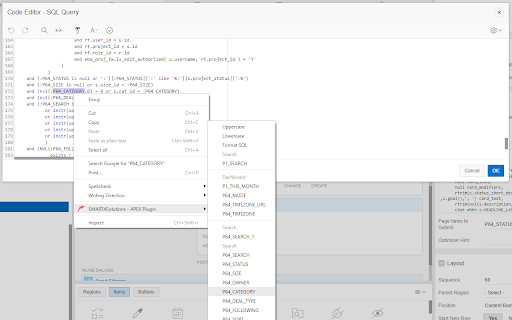
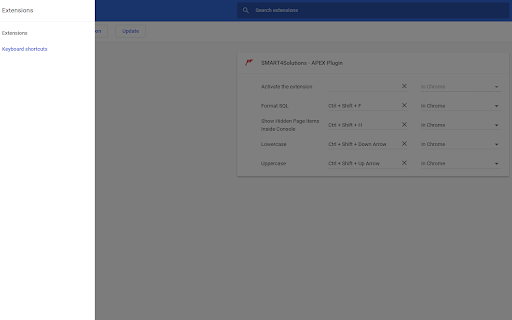
- Convert/Transform text to lowercase or UPPERCASE using a select list when right clicking selected text or shortcuts you can setup inside the google extensions manager.
- SQL Beautifier (In Progress).
- JS Beautifier
- APEX Items list to choose the variables available in your page.
- APEX Report Column names list to choose the variables available in your page.
- APEX System Binds list.
- Links to useful resources like: Universial theme, Font APEX, apex.world And Documantation.
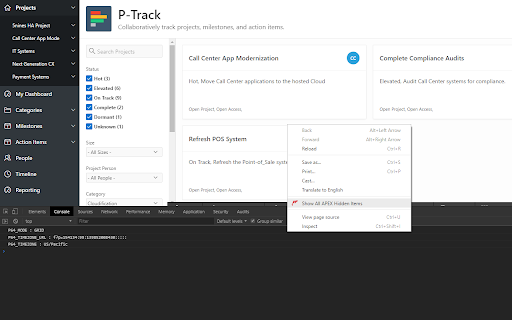
- Show hidden items inside your console.log.
v1.6:
CodeMirror Addons:
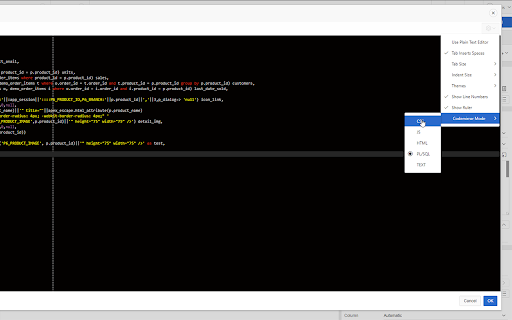
- Fullscreen the dode editor with F11
- Switch codeEditor Mode ex:(from TEXT to HTML) See screenshot
- Validate JS
- Beautify JS
- Validate CSS
- Beautify CSS
- Validate HTML
- Beautify HTML
- Beautify PL/SQL
| 分类 | 💻开发者工具 |
| 插件标识 | lgmmnahldjoppnjcbfacinccelajclnh |
| 平台 | Chrome |
| 评分 |
☆☆☆☆☆
|
| 评分人数 | |
| 插件主页 | https://chromewebstore.google.com/detail/smart4solutions-apex-plug/lgmmnahldjoppnjcbfacinccelajclnh |
| 版本号 | 8.3 |
| 大小 | 351KiB |
| 官网下载次数 | 265 |
| 下载地址 | |
| 更新时间 | 2019-01-03 00:00:00 |
CRX扩展文件安装方法
第1步: 打开Chrome浏览器的扩展程序
第2步:
在地址栏输入: chrome://extensions/
第3步: 开启右上角的【开发者模式】
第4步: 重启Chrome浏览器 (重要操作)
第5步: 重新打开扩展程序管理界面
第6步: 将下载的crx文件直接拖入页面完成安装
注意:请确保使用最新版本的Chrome浏览器