
HexString Converter Chrome 插件, crx 扩展下载
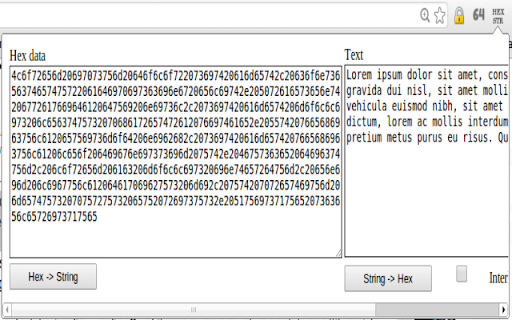
Converts HexString data into text and back.
Hex-to-String mode:
===================
Series of hexadecimal digits placed into the "Hex" section can be converted to unicode text usign the "Hex -> String" option. In this mode, the data is first converted into bytes, after which the data stream is assumed to represent UTF-8 encoded unicode text. All properly encoded characters are placed into the "Text" section. Octets possibly violating UTF-8 encoding rules are indicated using '?' symbols in the output.
White-spaces and line breaks within the "Hex" data are ignored.
String-to-Hex mode:
===================
Arbitrary text placed into the "Text" section can be converted into its hexadecimal representation using the "String -> Hex" option. The converted data can be presented in "compact" or "interleaved" (space-separated) format.
| 分类 | 💻开发者工具 |
| 插件标识 | libajdoapablnccbiakfbjjoofohelah |
| 平台 | Chrome |
| 评分 |
☆☆☆☆☆
|
| 评分人数 | |
| 插件主页 | https://chromewebstore.google.com/detail/hexstring-converter/libajdoapablnccbiakfbjjoofohelah |
| 版本号 | 8.3 |
| 大小 | 324KiB |
| 官网下载次数 | 736 |
| 下载地址 | |
| 更新时间 | 2013-08-07 00:00:00 |
CRX扩展文件安装方法
第1步: 打开Chrome浏览器的扩展程序
第2步:
在地址栏输入: chrome://extensions/
第3步: 开启右上角的【开发者模式】
第4步: 重启Chrome浏览器 (重要操作)
第5步: 重新打开扩展程序管理界面
第6步: 将下载的crx文件直接拖入页面完成安装
注意:请确保使用最新版本的Chrome浏览器