
TeamCity Extensions Chrome 插件, crx 扩展下载
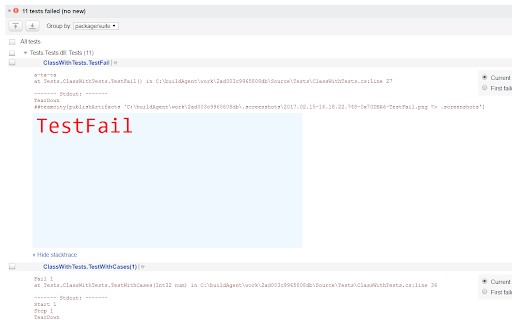
Append screenshots for failed test after stack trace.
A small Chrome extension for TeamCity to provide some additional functions to the user interface.
Features
* Show image published to artifacts after console log
Extension parse test stdout command ##teamcity[publishArtifacts '<path>'] and inject <img> tag after stacktrace
docs: https://confluence.jetbrains.com/display/TCD18/Build+Script+Interaction+with+TeamCity#BuildScriptInteractionwithTeamCity-PublishingArtifactswhiletheBuildisStillinProgress
v0.2.0
- Supprot for TeamCity v2020.1
v0.1.4
- Support for escaped symbols in artifact path
- Added download links for all artifacts published in test
v0.1.3
- Support for TeamCity 2018.1.1
| 分类 | 💻开发者工具 |
| 插件标识 | liecempkpelaenjhncgnhnefkdfhbocm |
| 平台 | Chrome |
| 评分 |
☆☆☆☆☆
|
| 评分人数 | |
| 插件主页 | https://chromewebstore.google.com/detail/teamcity-extensions/liecempkpelaenjhncgnhnefkdfhbocm |
| 版本号 | 8.3 |
| 大小 | 10.67KiB |
| 官网下载次数 | 194 |
| 下载地址 | |
| 更新时间 | 2020-06-16 00:00:00 |
CRX扩展文件安装方法
第1步: 打开Chrome浏览器的扩展程序
第2步:
在地址栏输入: chrome://extensions/
第3步: 开启右上角的【开发者模式】
第4步: 重启Chrome浏览器 (重要操作)
第5步: 重新打开扩展程序管理界面
第6步: 将下载的crx文件直接拖入页面完成安装
注意:请确保使用最新版本的Chrome浏览器