
twitview thread unroll/reader for twitter Chrome 插件, crx 扩展下载

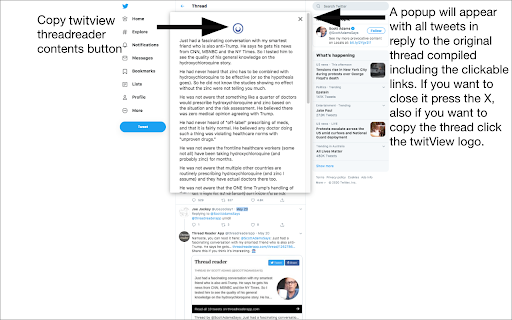
A google chrome extension to read twitter threads in an easier quick and concise manner.
A google chrome extension to read twitter threads in an easier, quick and concise manner.
To use the twitview simply follow these steps:
1. Install the app
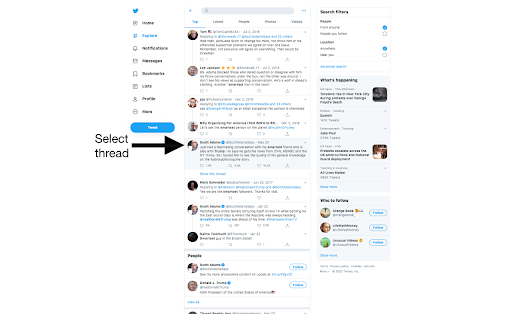
2. Go to twitter and find a thread you want read.
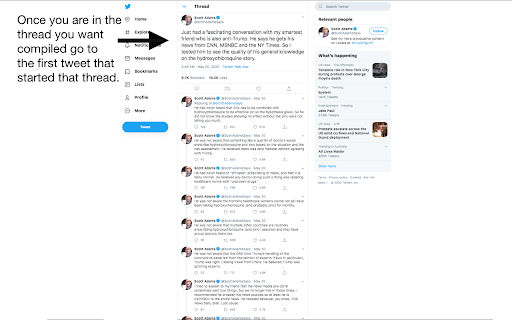
3.Now that you are in the thread you want compiled go to the first post of the thread which is the tweet that started the thread.
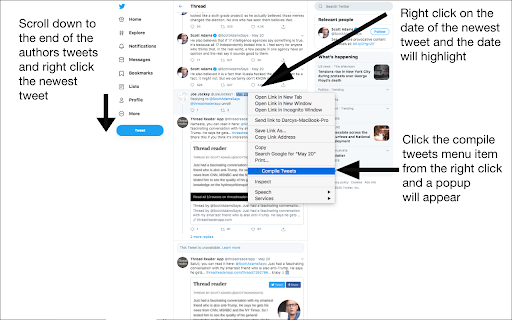
4.Once you are on that thread scroll to the tweet you want to compiled and go below the authors replies to a newer tweet.
5. Right click on the date of the newer tweet and you should see it underline and highlight.
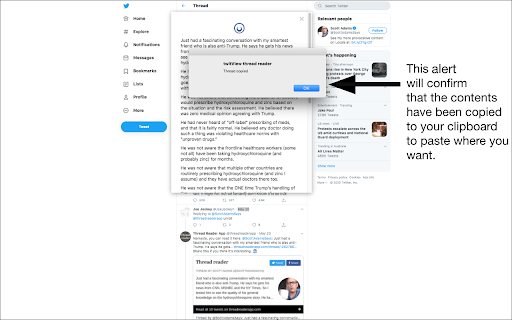
6.Click the compile tweet menu item from the right click menu and then a popup will appear with all tweets in reply to the original thread including the clickable links compiled.
Other points:
-Once the tweet is compiled you can click on the twitview symbol and you will be able to copy the entire thread.
-Images are not available yet but will potentially be added in the future as well as videos. If you encounter any errors navigate out of the page by clicking other comments then go back to the ORIGINAL FIRST POST and it will recompile no problems.
| 分类 | 📝工作流程与规划 |
| 插件标识 | ljdegdmkjoondijjmadjgammcbphodjl |
| 平台 | Chrome |
| 评分 |
☆☆☆☆☆
|
| 评分人数 | |
| 插件主页 | https://chromewebstore.google.com/detail/twitview-thread-unrollrea/ljdegdmkjoondijjmadjgammcbphodjl |
| 版本号 | 2.0.1 |
| 大小 | 692KiB |
| 官网下载次数 | 222 |
| 下载地址 | |
| 更新时间 | 2020-06-16 00:00:00 |
CRX扩展文件安装方法
第1步: 打开Chrome浏览器的扩展程序
第2步:
在地址栏输入: chrome://extensions/
第3步: 开启右上角的【开发者模式】
第4步: 重启Chrome浏览器 (重要操作)
第5步: 重新打开扩展程序管理界面
第6步: 将下载的crx文件直接拖入页面完成安装
注意:请确保使用最新版本的Chrome浏览器