
Jenkins Helper Chrome 插件, crx 扩展下载
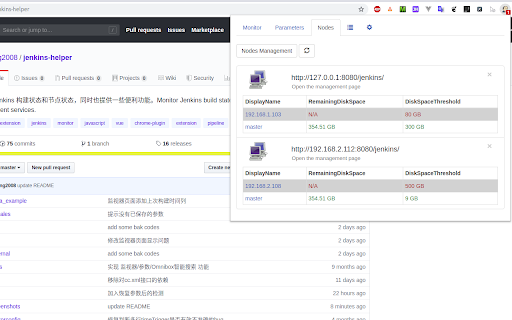
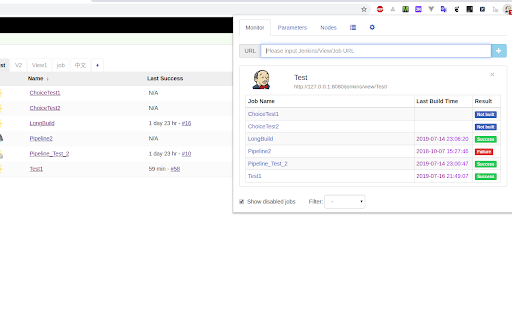
监控 Jenkins 构建状态和节点状态,同时也提供一些便利功能。
A Chrome browser extension that greatly improves the productivity of using Jenkins.
The extension can:
1. Job monitoring: monitor the build status of Jenkins Job, and display notification when the build is completed.
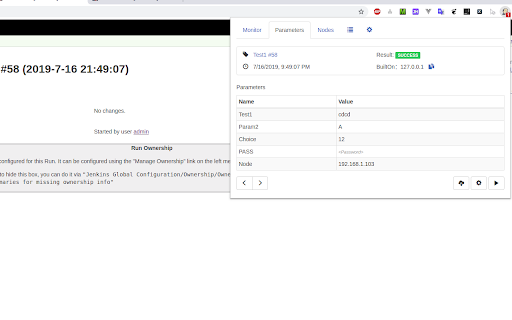
2. Build parameter view: Quickly view build information and build parameters under each Build page and its subpages.
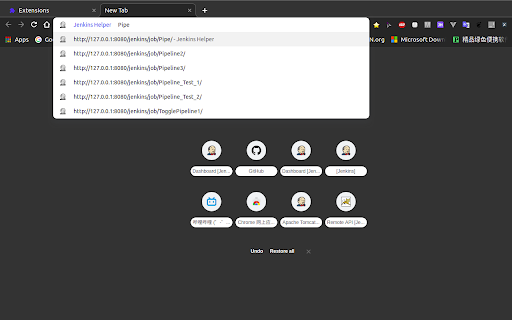
3. Intelligent search in the address bar: enter jk in the address bar, press Space or Tab to enter the Jenkins Job intelligent search mode, and enter the Job name to quickly match to the corresponding Jenkins Job link.
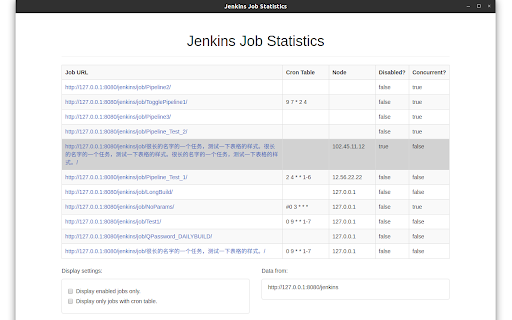
4. Job Statistics: Statistics Job's running node / timed build schedule / whether to disable / whether to allow concurrent information and so on.
5. Custom settings: Some personal settings can be made for your unique needs.
Source code:
https://github.com/liying2008/jenkins-helper
| 分类 | 📝工作流程与规划 |
| 插件标识 | lkjoiakaidioklnfdejmnoebfbjcbemh |
| 平台 | Chrome |
| 评分 |
☆☆☆☆☆
|
| 评分人数 | |
| 插件主页 | https://chromewebstore.google.com/detail/jenkins-helper/lkjoiakaidioklnfdejmnoebfbjcbemh |
| 版本号 | 25.2.3.0 |
| 大小 | 2.05MiB |
| 官网下载次数 | 422 |
| 下载地址 | |
| 更新时间 | 2021-08-04 00:00:00 |
CRX扩展文件安装方法
第1步: 打开Chrome浏览器的扩展程序
第2步:
在地址栏输入: chrome://extensions/
第3步: 开启右上角的【开发者模式】
第4步: 重启Chrome浏览器 (重要操作)
第5步: 重新打开扩展程序管理界面
第6步: 将下载的crx文件直接拖入页面完成安装
注意:请确保使用最新版本的Chrome浏览器