
SEO Peek Chrome 插件, crx 扩展下载
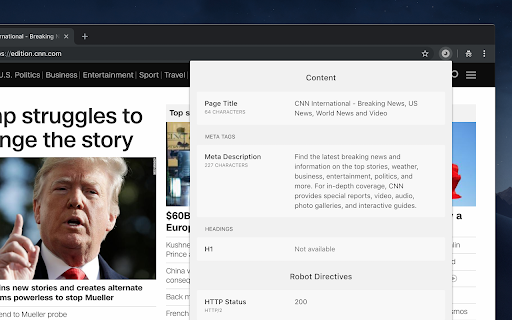
Just one click to get a quick peek into on-page SEO factors of the web page you visit in the browser.
***
This extension will stop working!
Hey there!
I want to let you know that starting in June 2024, Google will no longer support Chrome extensions with manifest v2. Unfortunately, this means that my extension will no longer work since it hasn't been updated to meet the requirements of manifest v3.
After giving it some thought, I've decided not to invest any more time in developing Chrome extensions. I'm sorry for any inconvenience this may cause, and I appreciate your trust in using my extension.
Thank you for your understanding and support.
Cheers,
Sander
***
Take a quick look at on-page SEO factors of the page you visit in the browser.
SEO Peek is a Chrome extension that checks the Document Object Model (DOM) of a page. There is no need to view the HTML source or inspect the DOM in the elements tab of Chrome DevTools.
SEO Peek checks the most relevant content elements and robot directives inside the DOM of both traditional server-side generated pages and client-side rendered pages like Single Page Applications (SPA).
Besides a check of HTML elements the extension also sends a request to the server to check the HTTP Status and several HTTP Response Headers like the HTTP Canonical header, X-Robots-Tag header and Vary header.
For all link elements and link headers the extension checks if the URL of a link element or link header refers to the URL of the current page (self-referential).
The HTTP status for the canonical URL is also being checked. When the response contains a redirect the extension detects the redirect and shows the response URL and its HTTP status.
The extension gives you insights into several relevant content elements and robot directives.
Content elements
- Page title
- Meta description
- Meta keywords
- H1 headings
Robot directives
- HTTP status
- Meta robots (Meta robots tag, X-Robots-Tag header)
- Canonicalization annotations (Canonical link tag, Canonical link header)
- Pagination annotations (Prev link tag, Next link tag)
- Mobile annotations (Rel-alternate-media annotation, Vary HTTP header, AMP HTML annotation)
- International annotations (Rel-alternate-hreflang annotation)
| 分类 | 🛠️工具 |
| 插件标识 | lkkpfhgjmocgneajknedjhodkjkkclod |
| 平台 | Chrome |
| 评分 |
☆☆☆☆☆
|
| 评分人数 | |
| 插件主页 | https://chromewebstore.google.com/detail/seo-peek/lkkpfhgjmocgneajknedjhodkjkkclod |
| 版本号 | 2.1.0 |
| 大小 | 61.75KiB |
| 官网下载次数 | 10000 |
| 下载地址 | |
| 更新时间 | 2024-02-11 00:00:00 |
CRX扩展文件安装方法
第1步: 打开Chrome浏览器的扩展程序
第2步:
在地址栏输入: chrome://extensions/
第3步: 开启右上角的【开发者模式】
第4步: 重启Chrome浏览器 (重要操作)
第5步: 重新打开扩展程序管理界面
第6步: 将下载的crx文件直接拖入页面完成安装
注意:请确保使用最新版本的Chrome浏览器