
PepperHud Chrome 插件, crx 扩展下载
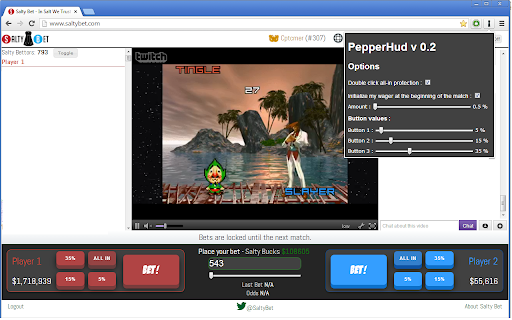
Extension for the website www.saltybet.com, adding controls to the interface. Bet on saltybet without ever using the keyboard !
-…
Extension for the website www.saltybet.com, adding controls to the interface. Bet on saltybet without ever using the keyboard !
- 4 new buttons for betting, one for going All-In (with activable double click all in protection), and the other three configurable in the options for the percentage of your wallet you want to bet
- A new slider under the Wager box, allowing you to change the amount you're betting
- An initialization function, that automatically inputs the value you want in the Wager box at the beginning of the match. Bet with only one click !
And more to come...
IMPORTANT : Refresh the page to confirm option changes !
Update log :
0.3.5 : New textboxes for the button values. Correction of a few minor issues
0.4 : - You can now use the mousewheel on all the sliders and textboxes (in the popup, and the one on the page)
- The slider now inputs a 1$ bet when all the way to the left
- The all-in buttons now look different if the all-in protection is activated
- New "Refresh Saltybet" button on the option popup
- The non-illuminati shouldn't have the bottom of the chat and video window hidden now.
| 分类 | ♿无障碍访问 |
| 插件标识 | llckihieacnggpaellaoihcdemebdfll |
| 平台 | Chrome |
| 评分 |
☆☆☆☆☆
|
| 评分人数 | |
| 插件主页 | https://chromewebstore.google.com/detail/pepperhud/llckihieacnggpaellaoihcdemebdfll |
| 版本号 | 2.19.1 |
| 大小 | 44.58KiB |
| 官网下载次数 | 66 |
| 下载地址 | |
| 更新时间 | 2013-09-15 00:00:00 |
CRX扩展文件安装方法
第1步: 打开Chrome浏览器的扩展程序
第2步:
在地址栏输入: chrome://extensions/
第3步: 开启右上角的【开发者模式】
第4步: 重启Chrome浏览器 (重要操作)
第5步: 重新打开扩展程序管理界面
第6步: 将下载的crx文件直接拖入页面完成安装
注意:请确保使用最新版本的Chrome浏览器