
Certified Artificial - CAT-L Verify Chrome 插件, crx 扩展下载
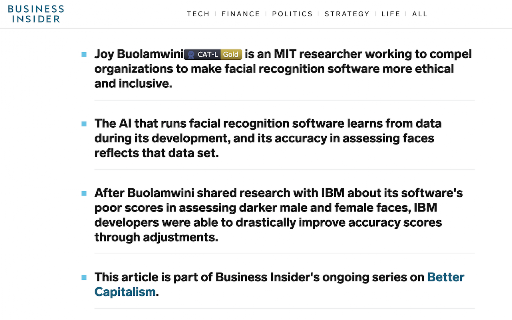
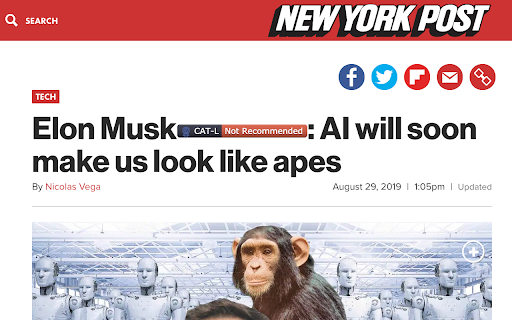
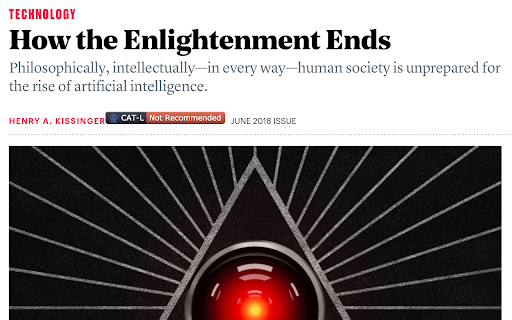
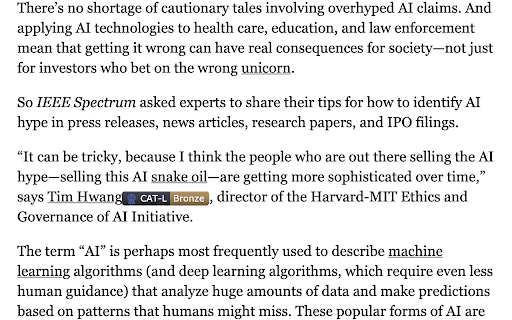
Leveraging the CAT-L database, this extension displays the appropriate verification badges for certified AI thought-leaders.
The hype around artificial intelligence has been a massive boon to a whole class of opinion formers, thought-leaders, and hot-take makers on social media. If you’re looking to find someone to write an op-ed, speak at your conference, or consult with your business, you’ll find a bewildering number of purported “experts” floating about the AI ecosystem.
How can you tell who is qualified? Who actually knows something about the latest breakthroughs in artificial intelligence, and who's simply pretending that they do? Who's pushing forward the latest advances in the technology, and who is merely riding the waves of media hype?
This extension dynamically modifies web pages to insert ratings of thought-leaders directly into the text of the sites. Verify™ leverages the public Certified AI Thought-Leader (CAT-L) database to insert certification badges—corresponding to live ratings of thought-leaders in the AI ecosystem—in context, anywhere on the web. Importantly, badges are only inserted into pages containing claims made about artificial intelligence and machine learning. The Verify™ software will not display ratings for thought-leaders who appear in the CAT-L database when these individuals comment publicly on or otherwise receive coverage in fields other than AI.
Verify™ is a free product of Certified Artificial, an AI standards firm. Certified Artificial offers certification services for corporate and individual clients. In the case of the CAT-L designation, for a nominal certification fee, Certified Artificial’s team of experts conduct a rigorous 50-point inspection and assign a CAT-L Gold, CAT-L Silver, or CAT-L Bronze credential—or, indeed, a “Do Not Recommend” rating—to thought-leaders in artificial intelligence. On a case-by-case basis, the Certified Artificial team also proactively assigns certifications to specific experts in the space.
Learn more at https://certifiedartificial.com.
| 分类 | 👥社交 |
| 插件标识 | llmgegdecopjnebpgdajmfkbeadgkonk |
| 平台 | Chrome |
| 评分 |
☆☆☆☆☆
|
| 评分人数 | |
| 插件主页 | https://chromewebstore.google.com/detail/certified-artificial-cat/llmgegdecopjnebpgdajmfkbeadgkonk |
| 版本号 | 3.128.4 |
| 大小 | 32.64KiB |
| 官网下载次数 | 24 |
| 下载地址 | |
| 更新时间 | 2019-09-26 00:00:00 |
CRX扩展文件安装方法
第1步: 打开Chrome浏览器的扩展程序
第2步:
在地址栏输入: chrome://extensions/
第3步: 开启右上角的【开发者模式】
第4步: 重启Chrome浏览器 (重要操作)
第5步: 重新打开扩展程序管理界面
第6步: 将下载的crx文件直接拖入页面完成安装
注意:请确保使用最新版本的Chrome浏览器