
Emojify Chrome 插件, crx 扩展下载

Seamless emoji conversion for Facebook Messenger: Give your Messenger emoji superpowers. Made with ❤️ and ? by DinoWare.
A handy extension to give you the ability to use emoji codes in Facebook's messenger.com, just like you'd do in Slack.
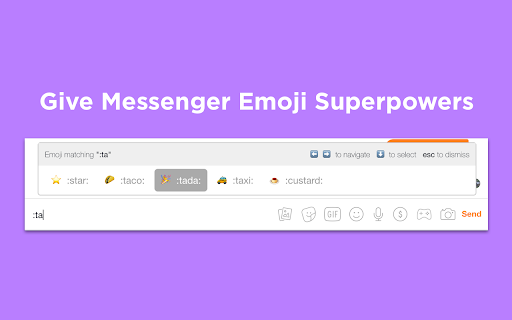
It's easy. Just enter an emoji code, such as ":tada:" and it'll automatically transform into an emoji (? in this case) right before your eyes!
Emojify has plenty of bells and whistles, too. With autocomplete at the ready, Emojify intelligently suggests emojis to you in realtime as you're typing out codes. With a tap of the down arrow, the emoji will insert itself, so you don't have to.
FAQ:
1. Q: I just installed it but it's not working on my already-open Messenger tab
A: Refresh the page and everything should be functional!
2. Q: I have some feedback/bug reports. Where should I send these?
A: Go ahead and shoot an email to dinowaredevelopment [at] gmail.com!
3. Q: Some of the emojis don't show up in the autocomplete panel. Why?
A: This is a limitation of your operating system. Recently, a new set of emojis was released and approved that some older operating systems might not recognize.
| 分类 | 👥社交 |
| 插件标识 | llmoocacphpgckbkjnldaglfmngnfhli |
| 平台 | Chrome |
| 评分 |
☆☆☆☆☆
|
| 评分人数 | |
| 插件主页 | https://chromewebstore.google.com/detail/emojify/llmoocacphpgckbkjnldaglfmngnfhli |
| 版本号 | 0.0.4 |
| 大小 | 55.06KiB |
| 官网下载次数 | 16 |
| 下载地址 | |
| 更新时间 | 2018-11-05 00:00:00 |
CRX扩展文件安装方法
第1步: 打开Chrome浏览器的扩展程序
第2步:
在地址栏输入: chrome://extensions/
第3步: 开启右上角的【开发者模式】
第4步: 重启Chrome浏览器 (重要操作)
第5步: 重新打开扩展程序管理界面
第6步: 将下载的crx文件直接拖入页面完成安装
注意:请确保使用最新版本的Chrome浏览器