
Realize for React Chrome 插件, crx 扩展下载
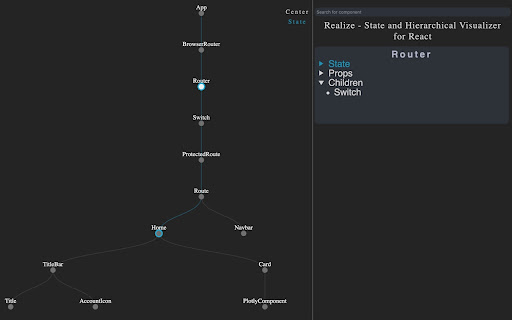
A React component tree visualizer
As React applications scale, it becomes more difficult to track state and to have a holistic overview of the component hierarchy. Realize is a tool to help developers visualize the structure and state flow of their React applications, especially when they are growing in scale and complexity. It currently supports React v.16.8.
Prerequisites
1. You must have React Dev Tools installed to use Realize for React. Install it from the Chrome store
2. Realize is best used on non-deployed applications. This uglification of deployed websites makes the component structure pretty unreadable.
How to use
1. Click the blue 'Add to Chrome' button
2. Once installed, navigate to your React website
3. Open the dev tools window and click on the Realize panel
4. Trigger a state change to populate the component tree
Functionality:
- Utilize the search bar to search for any component that exists in the tree.
- Clicking a node component will display information about state, children, props, and hooks in the right hand panel.
- You can zoom and pan the tree by holding shift and dragging/scrolling
- Click the 'State' button to view the flow of state through the component tree
| 分类 | 💻开发者工具 |
| 插件标识 | llondniabnmnappjekpflmgcikaiilmh |
| 平台 | Chrome |
| 评分 |
☆☆☆☆☆
|
| 评分人数 | |
| 插件主页 | https://chromewebstore.google.com/detail/realize-for-react/llondniabnmnappjekpflmgcikaiilmh |
| 版本号 | 1.0.0.0 |
| 大小 | 160KiB |
| 官网下载次数 | 3000 |
| 下载地址 | |
| 更新时间 | 2020-06-20 00:00:00 |
CRX扩展文件安装方法
第1步: 打开Chrome浏览器的扩展程序
第2步:
在地址栏输入: chrome://extensions/
第3步: 开启右上角的【开发者模式】
第4步: 重启Chrome浏览器 (重要操作)
第5步: 重新打开扩展程序管理界面
第6步: 将下载的crx文件直接拖入页面完成安装
注意:请确保使用最新版本的Chrome浏览器