
MAC-Addesss Notation Changer Chrome 插件, crx 扩展下载
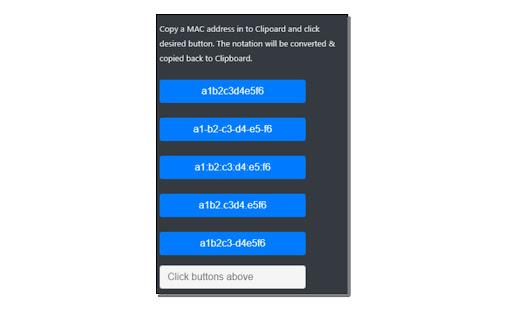
Convert any valid MAC-Address notation into another type of notation by a click on a button.
There is not much standardization in MAC hardware adress notations, so all these different invetory tools a network admin has to deal with every day use their own formats. I'm lazy and don't want to delete those dashes, punctuation marks and whatever manually. So copy the MAC adress and hit the button with the desired format - and your done! This little tool will re-format the notation and writes it back into your clipboard.
| 分类 | 📝工作流程与规划 |
| 插件标识 | lpeiokhoaenaeacmdibjjabghpelkfhb |
| 平台 | Chrome |
| 评分 |
☆☆☆☆☆
|
| 评分人数 | |
| 插件主页 | https://chromewebstore.google.com/detail/mac-addesss-notation-chan/lpeiokhoaenaeacmdibjjabghpelkfhb |
| 版本号 | 25.2.3.0 |
| 大小 | 12.25KiB |
| 官网下载次数 | 92 |
| 下载地址 | |
| 更新时间 | 2020-08-04 00:00:00 |
CRX扩展文件安装方法
第1步: 打开Chrome浏览器的扩展程序
第2步:
在地址栏输入: chrome://extensions/
第3步: 开启右上角的【开发者模式】
第4步: 重启Chrome浏览器 (重要操作)
第5步: 重新打开扩展程序管理界面
第6步: 将下载的crx文件直接拖入页面完成安装
注意:请确保使用最新版本的Chrome浏览器