
Bestlaw Chrome 插件, crx 扩展下载
A browser extension to add the features Westlaw and Lexis forgot.
Bestlaw adds features to Westlaw and Lexis to make legal research faster and easier. It has enhanced more than six million documents. It's used at top law schools, firms, nonprofits, and courts.
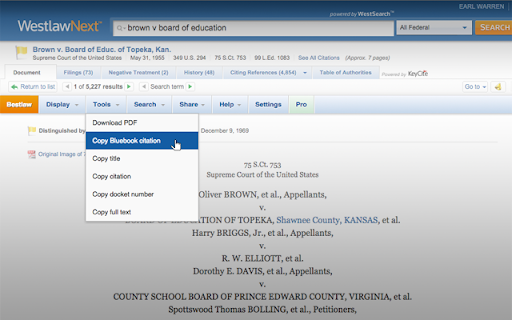
When you read a document—like a case, statute, or law review article—Bestlaw adds a toolbar with these features:
- Copy a perfect Bluebook citation with one click
- Read documents in a clean, readable view with beautiful typography
- Prevent getting automatically signed off
- Highlight dissenting and concurring opinions so you know what you're reading
- Collapse and expand statutory sections
- Automatically generate a clickable table of contents for any document
- One-click copying for citations, titles, docket numbers, and full text
- Highlight hard-to-see page numbers
- Jump between footnotes and the main text without losing your place
- Instantly look up information about a case on Wikipedia and other sources
- Share the document by email or on Facebook, Twitter, and Google+
Read more at http://www.bestlaw.io/
Most of Bestlaw's features are free. A few tools are part of Bestlaw Pro, which costs $5/month and includes:
- Automatic Bluebook citations
- Free secondary sources: get free access to journal articles and other materials.
- Free PDF downloads: save cases offline without getting charged.
- Free printing: never pay for printing cases.
To sign up for Bestlaw Pro, install Bestlaw, open a document on Westlaw or Lexis, and then click the "Pro" tab.
NEW IN v0.1.5.4:
- Fix Bluebooking bugs
*******************************
BY INSTALLING BESTLAW, YOU AGREE TO BE BOUND BY THE TERMS OF SERVICE, AVAILABLE AT https://s3.amazonaws.com/bestlaw/docs/terms-of-service.html
*******************************
Westlaw and WestlawNext are registered trademarks of West Publishing Corporation. Bestlaw is not affiliated with West, Westlaw, or WestlawNext.
| 分类 | 📝工作流程与规划 |
| 插件标识 | maffnemieclgahnalopfngbddfhneghd |
| 平台 | Chrome |
| 评分 |
☆☆☆☆☆
|
| 评分人数 | |
| 插件主页 | https://chromewebstore.google.com/detail/bestlaw/maffnemieclgahnalopfngbddfhneghd |
| 版本号 | 25.2.3.0 |
| 大小 | 363KiB |
| 官网下载次数 | 2000 |
| 下载地址 | |
| 更新时间 | 2017-08-13 00:00:00 |
CRX扩展文件安装方法
第1步: 打开Chrome浏览器的扩展程序
第2步:
在地址栏输入: chrome://extensions/
第3步: 开启右上角的【开发者模式】
第4步: 重启Chrome浏览器 (重要操作)
第5步: 重新打开扩展程序管理界面
第6步: 将下载的crx文件直接拖入页面完成安装
注意:请确保使用最新版本的Chrome浏览器