
Airport Code Explainer Chrome 插件, crx 扩展下载
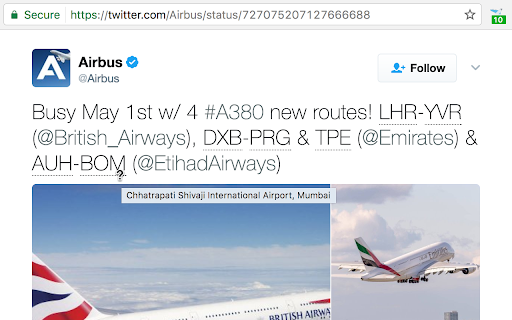
Look for IATA airport codes in a page and give them a tooltip with the full airport name.
People on social media will often post details of where they’re flying by just referencing airport codes. This is fine if you know which airports the (sometimes obscure) codes refer to. This extension finds any airport codes in the text of the current page, and adds a tooltip with the full airport name.
Press the plane icon to add the tooltips when needed. The extension doesn’t run automatically on any pages as there are too many false positives for common abbreviations (such as ATM and PDF).
I originally made this just to be lazy when I’m looking at Twitter, so it’s very simple at the moment. I’m open to suggestions for improving the extension.
• Code is open source at https://github.com/gilmoreorless/convert-airport-codes
• Airport data provided in the Public Domain by OurAirports: http://ourairports.com/data/
• Icon from EmojiOne, licensed CC-BY 4.0: http://emojione.com/
| 分类 | 🛠️工具 |
| 插件标识 | mceehpfaopbngcflhlgkabgjonnngmjf |
| 平台 | Chrome |
| 评分 |
☆☆☆☆☆
|
| 评分人数 | |
| 插件主页 | https://chromewebstore.google.com/detail/airport-code-explainer/mceehpfaopbngcflhlgkabgjonnngmjf |
| 版本号 | 1.0.0.47 |
| 大小 | 179KiB |
| 官网下载次数 | 231 |
| 下载地址 | |
| 更新时间 | 2020-12-15 00:00:00 |
CRX扩展文件安装方法
第1步: 打开Chrome浏览器的扩展程序
第2步:
在地址栏输入: chrome://extensions/
第3步: 开启右上角的【开发者模式】
第4步: 重启Chrome浏览器 (重要操作)
第5步: 重新打开扩展程序管理界面
第6步: 将下载的crx文件直接拖入页面完成安装
注意:请确保使用最新版本的Chrome浏览器