
Jira Improved Chrome 插件, crx 扩展下载
Improved Jira Agile boards!
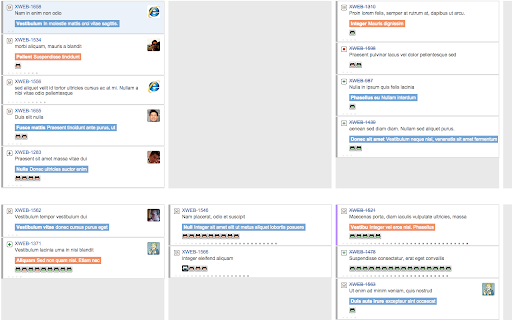
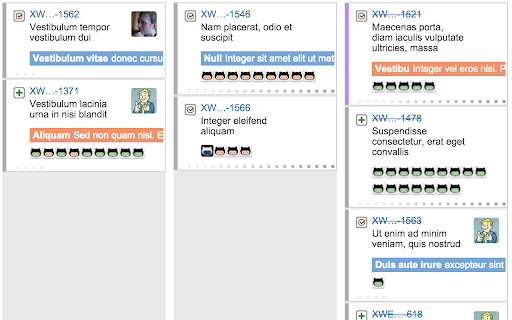
Improves the Agile and Kanban boards!
- Filter the tickets! (Keyboard shortcut: F)
- Epic name in issue cards.
- Show each pull requests in the card.
- Each github icon links to the pull request.
- Closed pull requests highlight green (done). Broken urls are inverted colors.
- Much more!! (the screenshots are out of date).
I ask for permission for "all sites" because I don't know which site you use for JIra. It only runs on pages that have the Jira Agile board view.
This plugin is open source. https://github.com/dylang/jira-improved
This is a third-party plugin. Not created or supported by Atlassian.
| 分类 | 💻开发者工具 |
| 插件标识 | mdfbpeoaadkecmpingophakekbicinip |
| 平台 | Chrome |
| 评分 |
☆☆☆☆☆
|
| 评分人数 | |
| 插件主页 | https://chromewebstore.google.com/detail/jira-improved/mdfbpeoaadkecmpingophakekbicinip |
| 版本号 | 8.3 |
| 大小 | 99.65KiB |
| 官网下载次数 | 322 |
| 下载地址 | |
| 更新时间 | 2016-05-03 00:00:00 |
CRX扩展文件安装方法
第1步: 打开Chrome浏览器的扩展程序
第2步:
在地址栏输入: chrome://extensions/
第3步: 开启右上角的【开发者模式】
第4步: 重启Chrome浏览器 (重要操作)
第5步: 重新打开扩展程序管理界面
第6步: 将下载的crx文件直接拖入页面完成安装
注意:请确保使用最新版本的Chrome浏览器