
LinkMaster Chrome 插件, crx 扩展下载
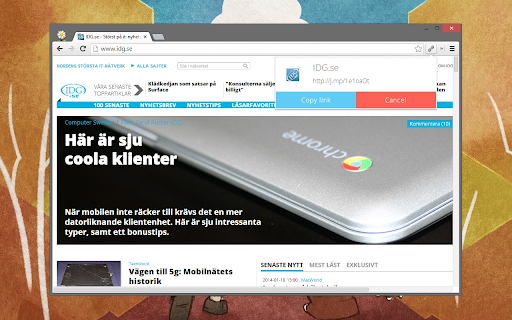
Make a short link.
Shorten links with a simple click.
You can create short links by clicking the link icon next to the tool on the top right or by using the rightclick-menu on images, HTML5-videos and links.
You'll need a bit.ly account to use this extension. Log in to bitly in the options. If you do not already have an account at Bitly, you can easily register directly or connect with Twitter or Facebook. You'll be able to use your own shortdomain if it is connected to your Bitly account.
~ Changelog ~
Update 18th January 2014:
+ Major redesign
+ Improved code
+ Enchanted popup-box when making links.
Update 24th August 2013:
+ Right-clicking images, videos and links to get a short link now works again.
+ Improved code
| 分类 | 📝工作流程与规划 |
| 插件标识 | mdgncmfemcgcpdmchnenmkgfdpedokgo |
| 平台 | Chrome |
| 评分 |
☆☆☆☆☆
|
| 评分人数 | |
| 插件主页 | https://chromewebstore.google.com/detail/linkmaster/mdgncmfemcgcpdmchnenmkgfdpedokgo |
| 版本号 | 0.4.2 |
| 大小 | 366KiB |
| 官网下载次数 | 2000 |
| 下载地址 | |
| 更新时间 | 2015-02-06 00:00:00 |
CRX扩展文件安装方法
第1步: 打开Chrome浏览器的扩展程序
第2步:
在地址栏输入: chrome://extensions/
第3步: 开启右上角的【开发者模式】
第4步: 重启Chrome浏览器 (重要操作)
第5步: 重新打开扩展程序管理界面
第6步: 将下载的crx文件直接拖入页面完成安装
注意:请确保使用最新版本的Chrome浏览器