
SAP Any Search Chrome 插件, crx 扩展下载
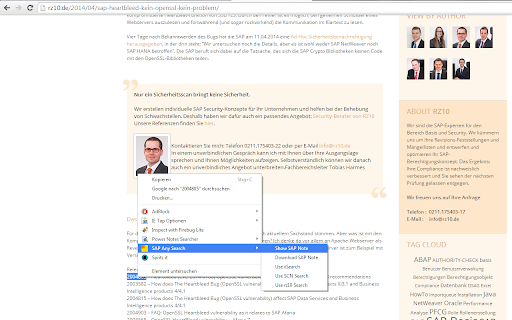
Provides an easy way to search/download SAP Notes, use SAP xSearch, SAP SCN Search and rz10 search.
SAP Any Search is the simple way for content related search of SAP topics. Select the search item or the SAP Note number in the text you actual read and choose one of the different search modes using the context menu of the google chrome extension (right click). Afterwards the result will be shown in a new browser tab.
Additionally, you can also download the SAP Note as a PDF file.
You can choose the following options:
- SAP Note Search
- SAP Note download
- SAP SCN Search
- SAP xSearch
- rz10.de Search (since version 1.3)
Version History:
Version 1.3.2
Restrictive access to websites by new permissions.
Version 1.3.1
Minor bugfix with version
Version 1.3:
New search option "Use rz10 search":
rz10.de is a German blog with many posts in SAP Basis and Security environment.
Multi-omnibox functionality:
Activate the omnibox with the keyword "search" or configure SAP Any Search
as default search engine. Then choose one of the folowing options:
- n [SAP Note number]: Opens the SAP Note
- p [SAP Note number]: Download the SAP Note as PDF file
- s [search item]: Search in SAP SCN
- x [search item]: Search in SAP xSearch
- r [search item]: Search in rz10.de
Example: search x Solution Manager
| 分类 | 🛠️工具 |
| 插件标识 | mgmdfdfbefjjlclpkeoljigohdofnaki |
| 平台 | Chrome |
| 评分 |
☆☆☆☆☆
|
| 评分人数 | |
| 插件主页 | https://chromewebstore.google.com/detail/sap-any-search/mgmdfdfbefjjlclpkeoljigohdofnaki |
| 版本号 | 1.0.0.47 |
| 大小 | 7.31KiB |
| 官网下载次数 | 412 |
| 下载地址 | |
| 更新时间 | 2014-05-15 00:00:00 |
CRX扩展文件安装方法
第1步: 打开Chrome浏览器的扩展程序
第2步:
在地址栏输入: chrome://extensions/
第3步: 开启右上角的【开发者模式】
第4步: 重启Chrome浏览器 (重要操作)
第5步: 重新打开扩展程序管理界面
第6步: 将下载的crx文件直接拖入页面完成安装
注意:请确保使用最新版本的Chrome浏览器