
Open Cookie Editor Chrome 插件, crx 扩展下载
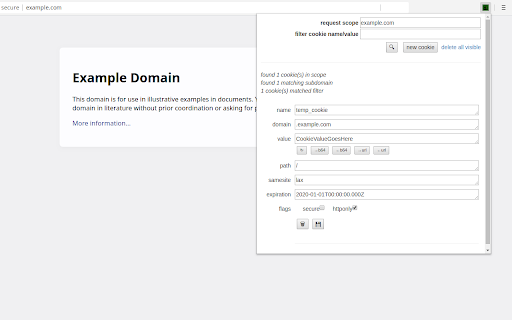
An open-source, minimalist cookie editor for chromium browsers.
Open Cookie Editor: A chromium cookie editor you can trust
I don’t trust many extensions which can read/write sensitive data from the browser, so I decided to write my own and opensource the code. The codebase is intentionally small, offering a minimalist cookie editor which can be source-code reviewed in a few minutes.
Some (hopefully) useful features:
- edit/delete all aspects of existing cookies
- create new cookies
- base64 & url encode/decode helpers
- smart search+filter within domain scope
Get it from the extensions store (or just install yourself):
If you’re extra paranoid about supply-chain attacks, review the code here, clone, and install as an unpacked extension locally:
https://b4ny4n.github.io/open-cookie-editor/
| 分类 | 💻开发者工具 |
| 插件标识 | mhelhppllnfkpaboohnijkfjeclehgab |
| 平台 | Chrome |
| 评分 |
☆☆☆☆☆
|
| 评分人数 | |
| 插件主页 | https://chromewebstore.google.com/detail/open-cookie-editor/mhelhppllnfkpaboohnijkfjeclehgab |
| 版本号 | 2.1 |
| 大小 | 18.77KiB |
| 官网下载次数 | 586 |
| 下载地址 | |
| 更新时间 | 2023-12-08 00:00:00 |
CRX扩展文件安装方法
第1步: 打开Chrome浏览器的扩展程序
第2步:
在地址栏输入: chrome://extensions/
第3步: 开启右上角的【开发者模式】
第4步: 重启Chrome浏览器 (重要操作)
第5步: 重新打开扩展程序管理界面
第6步: 将下载的crx文件直接拖入页面完成安装
注意:请确保使用最新版本的Chrome浏览器