
VoiceSissy (Speech-to-Text-to-Speech TTS STT) Chrome 插件, crx 扩展下载
Select to speech helper. Supporting VOICEVOX and Chrome built-ins.
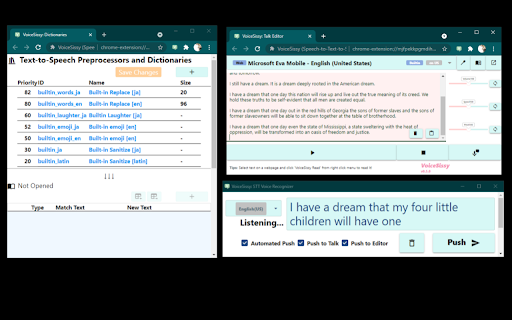
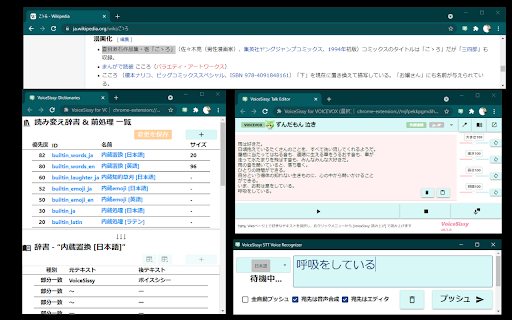
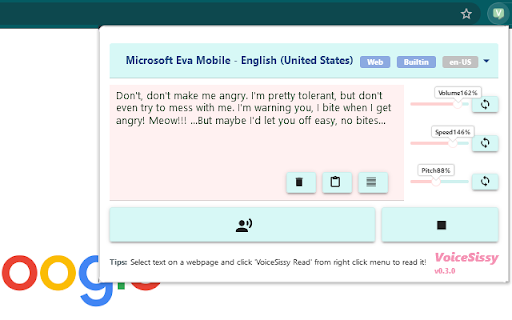
VoiceSissy is easy-to-use select-to-speech tool as well as text-to-speech (TTS) AND speech-to-text (STT) text editor.
- Turn your speech into machine voiced (Realtime Speech-to-Text-to-Speech)
- Transcribe your speech in text edtor (STT Transcriber Editor)
- Read selected text on any webpage (Text segmentation and TTS)
- Read your text as you write (TTS Talk Editor)
Originally this software was developed for VOICEVOX but you can use it with Chrome's built-in voice synthesizers. VOICEVOX produces human-quality tech-to-speech (TTS) deep learning technology to human-quality TTS in Japanes, and it's free :)
VoiceSissy supports the following TTS engine for now.
- Built-in Voice Synthesis
- Google Chrome built-ins
- English, Spanish, French, German, Japanese etc...
- Operation System built-ins
- Microsoft voices (on Windows)
- Apple voices (on macOS)
- VOICEVOX
- Shikoku Metan (Japanese)
- Zundamon (Japanese)
- Bouyomi-Chan (via WebSocket plugin)
Usage:
1. Open https://voicevox.hiroshiba.jp/ and setup VOICEVOX.
2. Run VOICEVOX on your machine.
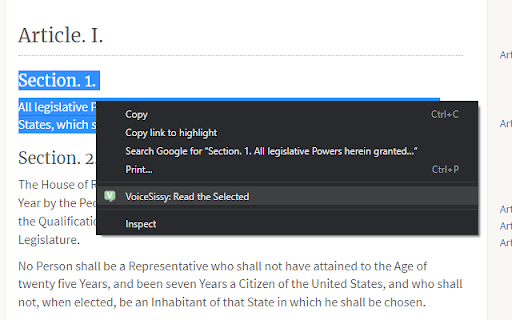
3. Select any text on your browser, right click, then select "VoiceSissy : Read".
4. Browser will read out the selected text.
Support:
Throw any complaint or idea to my twitter, I might consider writing code for it :)
http://twitter.com/higon/
| 分类 | ♿无障碍访问 |
| 插件标识 | mjfpekkpgmdihmfemmiodkhiebgbjnhm |
| 平台 | Chrome |
| 评分 |
☆☆☆☆☆
|
| 评分人数 | |
| 插件主页 | https://chromewebstore.google.com/detail/voicesissy-speech-to-text/mjfpekkpgmdihmfemmiodkhiebgbjnhm |
| 版本号 | 2.19.1 |
| 大小 | 3.17MiB |
| 官网下载次数 | 2000 |
| 下载地址 | |
| 更新时间 | 2021-08-16 00:00:00 |
CRX扩展文件安装方法
第1步: 打开Chrome浏览器的扩展程序
第2步:
在地址栏输入: chrome://extensions/
第3步: 开启右上角的【开发者模式】
第4步: 重启Chrome浏览器 (重要操作)
第5步: 重新打开扩展程序管理界面
第6步: 将下载的crx文件直接拖入页面完成安装
注意:请确保使用最新版本的Chrome浏览器