
Search on PatSnap Chrome 插件, crx 扩展下载
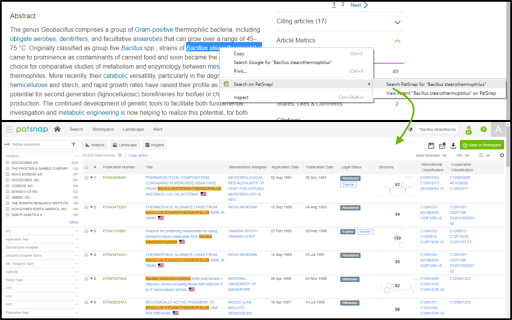
As you read emails, articles, and webpages, you can select keywords, right-click, and jump straight to relevant patents on PatSnap.
Sort out all your innovation and IP matters with ease using PatSnap's Chrome Extension!
* Quickly find relevant patents to a keyword or phrase.
As you read emails, articles, and webpages, you can select keywords, right-click, and jump straight to relevant patents on PatSnap.
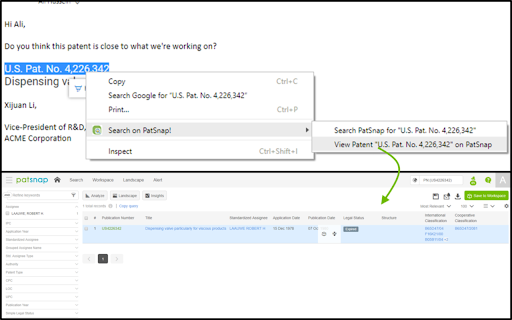
* Waste no time reading a patent from a publication number.
Select your text, right-click, and you're reading in no time.
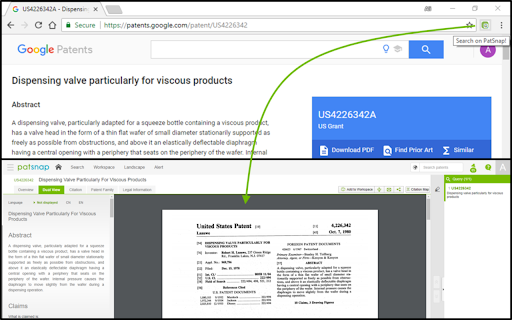
* Enough of Google Patents. Enjoy a more powerful experience.
One-click of the PatSnap icon transports you from Google Patents into the powerful reading capabilities of PatSnap, including:
- Dual View
- Citation Tree Analysis
- Patent Family Analysis
- Strong Keyword Highlighting
- Chemical Highlighting
..and more
| 分类 | 📝工作流程与规划 |
| 插件标识 | mkjcdfhmlkkdephppblgdjfiojdoafep |
| 平台 | Chrome |
| 评分 |
☆☆☆☆☆
|
| 评分人数 | |
| 插件主页 | https://chromewebstore.google.com/detail/search-on-patsnap/mkjcdfhmlkkdephppblgdjfiojdoafep |
| 版本号 | 25.2.3.0 |
| 大小 | 23.35KiB |
| 官网下载次数 | 199 |
| 下载地址 | |
| 更新时间 | 2018-05-29 00:00:00 |
CRX扩展文件安装方法
第1步: 打开Chrome浏览器的扩展程序
第2步:
在地址栏输入: chrome://extensions/
第3步: 开启右上角的【开发者模式】
第4步: 重启Chrome浏览器 (重要操作)
第5步: 重新打开扩展程序管理界面
第6步: 将下载的crx文件直接拖入页面完成安装
注意:请确保使用最新版本的Chrome浏览器