
OmniStudio Project Explorer Chrome 插件, crx 扩展下载
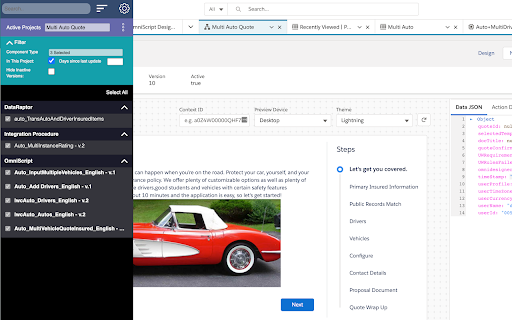
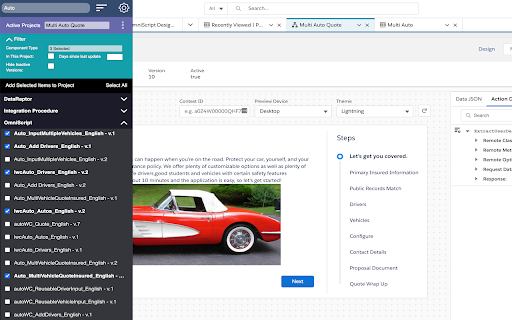
This extension will make it easier to navigate between Saleforce Industries projects and its components in your org.
OmniStudio Project Explorer lets a Salesforce Industries user navigate Salesforce Industries features such as OmniScript, FlexCard, Integration Procedures, DataRaptors, and etc., and include a set of the instances in a "Module" project so you can migrate the feature instances between orgs as a group using IDX Workbench.
- Filter and search Salesforce Industries feature types
- Search navigate the feature instances - Create "Module" projects in a Salesforce org
- Add / Remove the feature instances in a "Module" project
- List all the feature instances in a "Module" project
OmniStudio Project Explorer requires CME or INS Salesforce Industries Packages (version 109 or above)
| 分类 | 💻开发者工具 |
| 插件标识 | mlinmlldlfpiioajgllnnnkhhhiakdmi |
| 平台 | Chrome |
| 评分 |
☆☆☆☆☆
|
| 评分人数 | |
| 插件主页 | https://chromewebstore.google.com/detail/omnistudio-project-explor/mlinmlldlfpiioajgllnnnkhhhiakdmi |
| 版本号 | 1.0 |
| 大小 | 1.28MiB |
| 官网下载次数 | 1000 |
| 下载地址 | |
| 更新时间 | 2021-03-01 00:00:00 |
CRX扩展文件安装方法
第1步: 打开Chrome浏览器的扩展程序
第2步:
在地址栏输入: chrome://extensions/
第3步: 开启右上角的【开发者模式】
第4步: 重启Chrome浏览器 (重要操作)
第5步: 重新打开扩展程序管理界面
第6步: 将下载的crx文件直接拖入页面完成安装
注意:请确保使用最新版本的Chrome浏览器