
SNow Vim Chrome 插件, crx 扩展下载
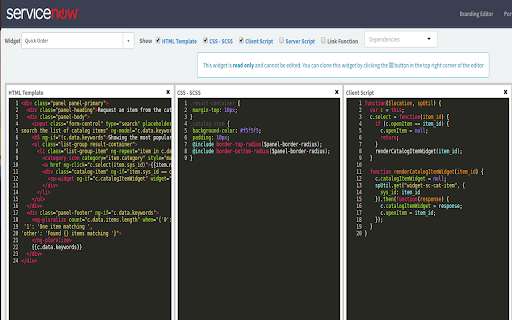
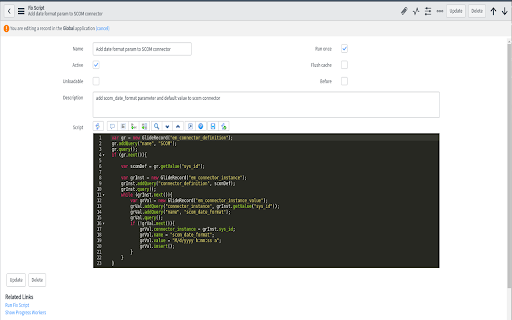
Extension for adding vim keymap as well as applying monokai theme and :w saving within codemirror in ServiceNow
This is a quick Chrome browser extension I developed that adds the vim keymap, monokai theme, and ctrl+s or :w saving functionality within code mirror inputs throughout the ServiceNow platform.
Change Log:
v0.0.4 - Added ctrl+s detection for saving UI Scripts
v0.0.5 - Added ctrl+s saving for (hopefully) all codemirror instances
v0.0.6 - Inject jQuery when not present (for the debugger in Istanbul)
v0.0.7 - Added breakpoint highlighting to the monokai theme
v0.0.8 - Configurable to use tabs/spaces and enable/disable vim keymap
| 分类 | 📝工作流程与规划 |
| 插件标识 | mnoocmhjgjfdfcfhieolgiceijdadkgp |
| 平台 | Chrome |
| 评分 |
☆☆☆☆☆
|
| 评分人数 | |
| 插件主页 | https://chromewebstore.google.com/detail/snow-vim/mnoocmhjgjfdfcfhieolgiceijdadkgp |
| 版本号 | 25.2.3.0 |
| 大小 | 141KiB |
| 官网下载次数 | 34 |
| 下载地址 | |
| 更新时间 | 2018-01-24 00:00:00 |
CRX扩展文件安装方法
第1步: 打开Chrome浏览器的扩展程序
第2步:
在地址栏输入: chrome://extensions/
第3步: 开启右上角的【开发者模式】
第4步: 重启Chrome浏览器 (重要操作)
第5步: 重新打开扩展程序管理界面
第6步: 将下载的crx文件直接拖入页面完成安装
注意:请确保使用最新版本的Chrome浏览器