
G RTF: Plain to Rich Text Chrome 插件, crx 扩展下载
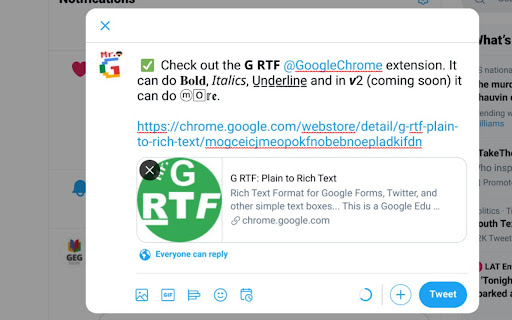

GRTF is Rich Text Format for Google Forms, Twitter, and other non-RTF text boxes... This version is dedicated to #LJTECHi3.
?????? ???: v2.2.1.37
? Different layout/look
????????????: Select text > Right-click on selected text > Mouse-over Format > Select format type > Paste over selected text (CTRL+V, or right-click on selected text and select paste).
??????? ???????????: This extension converts plain text to rich text in places like Google Forms, Twitter, Facebook and t̲h̲i̲s̲ explanation with G-RTF!
?????? ??? ????????? #?????: How might we help educators emphasize key points in Google Forms so students can better understand the instructions? By using a Chrome Extension that converts simple text to rich text, educators can create better instructions.
???????????:
? This is for the supportive team @LaJoyaISDEdTech #LJTECHi3 who belived in me and cheered me on.
? My wife and family who had to deal with my crazy antics.
? GEG-SOUTX community for the support and encoragement.
? The #GoogleEI community for supporting me through the #VIA20 Final Showcase. Thank you for your advice @karrieweb2004 @jentechnology @claycodes @pertuzluisfer and many more.
? Dr. Corbeil, Dr. Corbeil, and my other M.Ed. in EdTech professors for the encourgement.
? Dr. Alexander for promoting this extension. Check out her video - https://youtu.be/DFC45a4ZKLo
? ...and many more for the inspiration and encouragement.
??????? ???????:
?.?.?.?
? - Full ?ersion Update.
? - Extension ?anifest Version.
? - Code ?uild Attempt or minor changes.
? - Webstore ?ubmission Attempt or minor changes.
| 分类 | 📝工作流程与规划 |
| 插件标识 | mogceicjmeopokfnobebnoepladkifdn |
| 平台 | Chrome |
| 评分 |
☆☆☆☆☆
|
| 评分人数 | |
| 插件主页 | https://chromewebstore.google.com/detail/g-rtf-plain-to-rich-text/mogceicjmeopokfnobebnoepladkifdn |
| 版本号 | 25.2.3.0 |
| 大小 | 27.75KiB |
| 官网下载次数 | 950 |
| 下载地址 | |
| 更新时间 | 2021-08-22 00:00:00 |
CRX扩展文件安装方法
第1步: 打开Chrome浏览器的扩展程序
第2步:
在地址栏输入: chrome://extensions/
第3步: 开启右上角的【开发者模式】
第4步: 重启Chrome浏览器 (重要操作)
第5步: 重新打开扩展程序管理界面
第6步: 将下载的crx文件直接拖入页面完成安装
注意:请确保使用最新版本的Chrome浏览器