
Divider Tabs Chrome 插件, crx 扩展下载
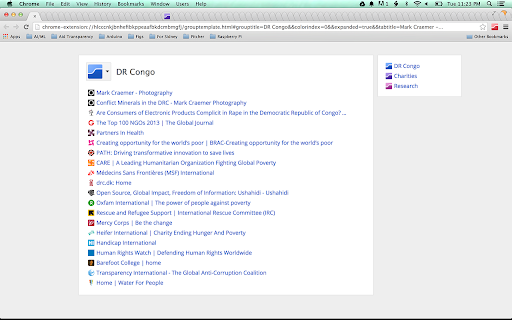
Manage a ton of tabs with dividers and collapsible groups
Divider Tabs helps you manage lots of tabs by using the model of a 3-ring binder:
- click the Divider Tabs icon next to the address bar to insert a named, color-coded Divider Tab to separate groups of related tabs
- the Divider Tab contains a hyperlinked index of all the tabs in that group
- click the colored chip on a Divider Tab to close all tabs in the group... click again to restore.
- you can use the keyboard shortcut Alt+D to set focus back to the nearest Divider Tab
| 分类 | 📝工作流程与规划 |
| 插件标识 | mpbblhoepkmpgalgppdoahgeoknmjgpc |
| 平台 | Chrome |
| 评分 |
☆☆☆☆☆
|
| 评分人数 | |
| 插件主页 | https://chromewebstore.google.com/detail/divider-tabs/mpbblhoepkmpgalgppdoahgeoknmjgpc |
| 版本号 | 1.0.15 |
| 大小 | 200KiB |
| 官网下载次数 | 30000 |
| 下载地址 | |
| 更新时间 | 2018-06-29 00:00:00 |
CRX扩展文件安装方法
第1步: 打开Chrome浏览器的扩展程序
第2步:
在地址栏输入: chrome://extensions/
第3步: 开启右上角的【开发者模式】
第4步: 重启Chrome浏览器 (重要操作)
第5步: 重新打开扩展程序管理界面
第6步: 将下载的crx文件直接拖入页面完成安装
注意:请确保使用最新版本的Chrome浏览器