
Pinboard Plus Chrome 插件, crx 扩展下载
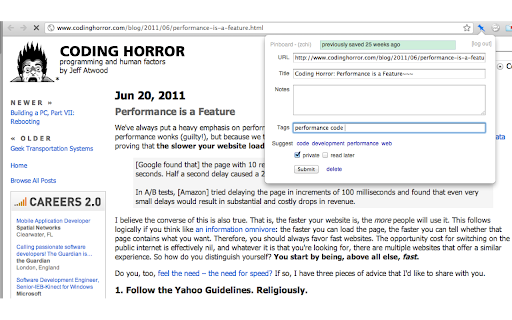
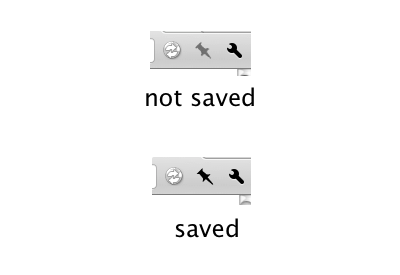
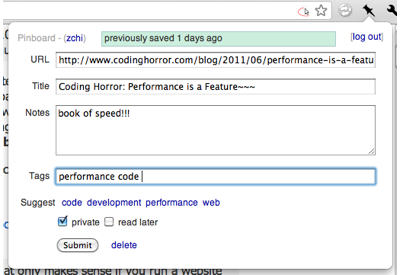
A better extension for Pinboard (http://pinboard.in). Easy to know current page has been saved or not.
Pinboard Plus is a better Chrome extension for Pinboard.in.
Easy to know current page has been saved or not.
* Icon changing to show current page has been saved or not
* Add, modify and delete bookmarks from the popup window
* Same UI style with Pinboard official site
* Set private if in Incognito Mode
Contact me: @ClvrObj
----------------------------------------------------------------
Update:
2.13.0: Add AI summarizer✨: Now you can let ChatGPT summarize the page for you! Just go to the options and turn it on!
2.12.5: Bugfix.
2.12.4: Update the icons to adapt to the dark mode.
2.12.3: Improve case sensitive auto completion for tags; Increase auto suggestion list size(5 -> 7), kudos to @jorge0136.
2.12.2: Utilizing local meta keywords tags to suggest better and more relevant tags. Thanks Ventz Petkov.
2.12.1: Remove header from options page.
2.12: Better WebExtension compatibility. Thanks @hyperfekt
2.11.5: fix issue Tab auto-complete only works on second load
2.11.4: new tags can be auto-complete now
2.11.3: check if Pinboard API down
2.11.2: less notification (no notify when query post status)
2.11.1: Show notification if error(including the token expired, API down etc.) occurs
2.11: better error handling for logging in
2.10: Add option to auto-enable 'private' in Incognito Mode. @the_kenny
2.9: Tags input improvements. By @kosqx
2.8: Add option to check "read later" by default. Thanks @sublimino !
2.7: Tags suggestion small improvement.
2.6 Using Pinboard API token to login.
2.4 Add blockquote options, thanks @spl.
2.3 bugfix.
2.0 Code refactor.
1.15 Suggestions improve by @seansay and bugfix.
1.14 New indicator icon by Tamim Swaid ( @tamimat ).
1.13: New item in options: private always checked.
1.12: Automatically encloses the description in <blockquote> tags when it's populated from the window's current selection, thanks @cdzombak
1.11: You can disable bookmark auto-check in options page, thanks @statico
1.10: Fix tag autocomplete bug kudos goes to @concept47
1.9: C-n, C-p to select tags.
1.8: Bugfix.
1.7: Fix login failed issue on Chrome beta, kudos goes to @cdzombak
1.6: Bug fix.
1.5: Fixed focus at tags input when popup open.
1.4: Colored icon!
1.3: add saving state icon and bug fix.
1.2: close popup after hit submit;
text selected copy to "Notes" field of popup;
bug fix.
| 分类 | 📝工作流程与规划 |
| 插件标识 | mphdppdgoagghpmmhodmfajjlloijnbd |
| 平台 | Chrome |
| 评分 |
☆☆☆☆☆
|
| 评分人数 | |
| 插件主页 | https://chromewebstore.google.com/detail/pinboard-plus/mphdppdgoagghpmmhodmfajjlloijnbd |
| 版本号 | 25.2.3.0 |
| 大小 | 198KiB |
| 官网下载次数 | 5000 |
| 下载地址 | |
| 更新时间 | 2023-04-01 00:00:00 |
CRX扩展文件安装方法
第1步: 打开Chrome浏览器的扩展程序
第2步:
在地址栏输入: chrome://extensions/
第3步: 开启右上角的【开发者模式】
第4步: 重启Chrome浏览器 (重要操作)
第5步: 重新打开扩展程序管理界面
第6步: 将下载的crx文件直接拖入页面完成安装
注意:请确保使用最新版本的Chrome浏览器