
CloudFlare Purge Plugin Chrome 插件, crx 扩展下载
This extension can purge the CloudFlare cache for the current page of your CloudFlare enabled website
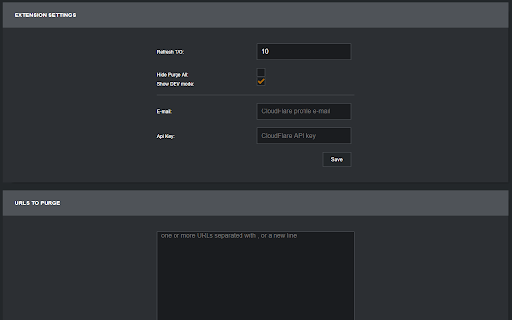
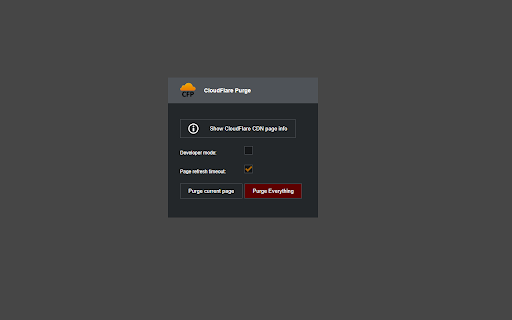
The Cloudflare purge plugin uses the Cloudflare API to purge any page of a website that serves its contents through the Cloudflare CDN. After you set your CF e-mail and API key in the options, you can purge the cache of any page of your CF enabled website. After version 1.3, you can purge the entire cache for the domain of your current tab.
Updates:
=========================================
v 1.8.0: Migrated the extension to use Chrome Manifest V3 for improved security and better compatibility with Google Chrome. Added a list of all user owned cloudflare zones for the current API key on the options page.
v 1.7.0: Added the ability to have multiple Cloudflare tokens and select between different profiles. Fixed a bug with the domain parsing logic. Special thanks to the active members of the community for their great feedback.
v1.6.2: Refactored the way the extension makes asynchronous requests to the Cloudflare API to follow the Chrome safety requirements and use a background page.
v1.6.1: Added support for Cloudflare API Tokens. Please check https://www.cf-purge.com/token-setup.html to find out more.
v1.6.0: Rewrote the whole extension using the latest ECMA script 7 APIs. The extension executes code in a non-blocking manner.
Refreshed the UI with a new design. The next version (1.6.1) will support the long awaited CloudFlare restricted API keys. Stay tuned.
v1.5.1: Added a new feature for managing CloudFlare DEV mode for your domains
v1.5.0: Added support for Mozilla Firefox
v 1.4.3: Masked the API key input. Fixed issues with the parsing of second level domains in the URL.
v 1.4.2: Added an option to show/hide the "Purge Entire Cache" button
v 1.4.1: Fixed a critical issue when purging domains without a leading sub-domain
v 1.4.0: Changed the design to reflect the new CloudFlare design guidelines. Refactored the extension code and optimized the API calls.
v 1.3.6: Included the ability to purge multiple URLs at the same time from the options screen.
v 1.3.5: Added a way to check the error message that gets returned from Cloudflare by clicking on the "Purge failed" red text
v 1.3.4: Fixed an issue when trying to purge apex domains
v 1.3.3: Changed the logic for the "Info" button to show the info even when some parts of it are missing
v 1.3.2: Added a new "Info" button that shows the Cloudflare node, Ray ID and the current Cache-Control header values.
v 1.3.1: Pushed a fix for a bug related to anchor links with spaces in the URL. Thanks to "solarroger".
v 1.3: Added a new option to purge the whole cache for the domain of the current tab
v 1.2.2: A small bug fix for the refresh functionality caused by auto updates.
v 1.2.1: Added a new refresh timeout option that delays the page refresh.
v 1.1: Includes a refresh function that refreshes the page on a successful purge
v 1.0: The extension includes all the basic functionality that you need to purge the URL in your active tab.
| 分类 | 💻开发者工具 |
| 插件标识 | nbpecchpcfacahhekolpaofpmogkmmok |
| 平台 | Chrome |
| 评分 |
★★★★★
5
|
| 评分人数 | 7 |
| 插件主页 | https://chromewebstore.google.com/detail/cloudflare-purge-plugin/nbpecchpcfacahhekolpaofpmogkmmok |
| 版本号 | 1.8.0 |
| 大小 | 89.02KiB |
| 官网下载次数 | 10000 |
| 下载地址 | |
| 更新时间 | 2023-09-04 00:00:00 |
CRX扩展文件安装方法
第1步: 打开Chrome浏览器的扩展程序
第2步:
在地址栏输入: chrome://extensions/
第3步: 开启右上角的【开发者模式】
第4步: 重启Chrome浏览器 (重要操作)
第5步: 重新打开扩展程序管理界面
第6步: 将下载的crx文件直接拖入页面完成安装
注意:请确保使用最新版本的Chrome浏览器
同类插件推荐

Silk - Privacy Pass Client
Client support for Privacy Pass anonymous authoriz

warp
Open frequently used bookmarks fast without a sing

Cloudflare Optics
Provides connection and security information when

CloudFlare Skinny
Reduces the height of websites listed when logged

Dr.FLARE
Get insights of your Cloudflared website. Provides

CloudFlare Purge Plugin
This extension can purge the CloudFlare cache for

Chrome Cloudflare Helper
A Chrome extension to detect whether the response

CloudFreed CloudFlare Turnstile Solver
Solve CloudFlare Turnstile Challenges Automaticall

Claire
Shows an orange cloud in the omnibar when you are

I'm not robot captcha clicker
I'm not robot captcha clickerThis extension wi

reCAPTCHA Autoclick
Automatically clicks reCAPTCHA buttons when detect

NopeCHA: CAPTCHA Solver
AI Solver for reCAPTCHA, FunCAPTCHA, and all CAPTC

Siderite's DNS Resolver
Resolve DNS addresses based on previously working