
1Click notepad Chrome 插件, crx 扩展下载

Write and save text in one click
The easiest and cleverest way to write text and save it.
This extension is an open-source ? extension. What is it mean for you:
☑ It's mean it's safe. Everyone can inspect the source code.
☑ It's mean that if you're are a developer or intern your more than welcome to contribute code.
This extension is another extension of 1ce. Our mission is to advance open-source extensions.
Visit our website to learn more, and be part of the community: https://1ce.org
If you have a question, visit the FAQ section on our website: https://1ce.org
Usage Guide:
1. Install the extension (click "Add to Chrome")
2. click on browseraction
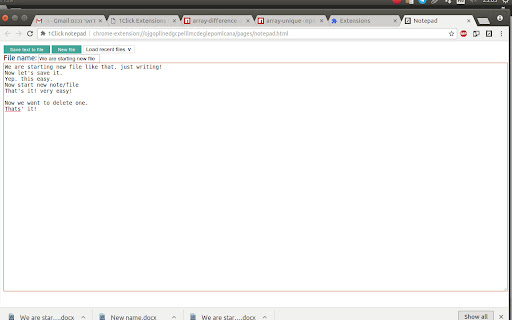
3. In the window that opens, start writing in the large text field
4. You can, but do not have to, change the title of the document.
5. To save, click the "Save Text to Document"
6. To start a new document, click "New Document"
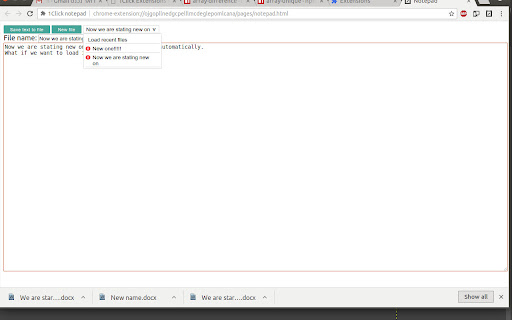
7. To load previous documents, upload them from the list above ("Previous Documents")
8. To delete previous documents, click the X next to their name.
For more instruction visit the website: https://1ce.org
Permissions explain:
No permissions needed!
We don't use this permission to anything else.
Data Usage:
We do not record any of your data usage. Everything stay private on your machine, until your decide you want to share it.
| 分类 | 📝工作流程与规划 |
| 插件标识 | ncdehknbdgeloabkfapjjkagadejaohj |
| 平台 | Chrome |
| 评分 |
☆☆☆☆☆
|
| 评分人数 | |
| 插件主页 | https://chromewebstore.google.com/detail/1click-notepad/ncdehknbdgeloabkfapjjkagadejaohj |
| 版本号 | 1.0.1 |
| 大小 | 59.57KiB |
| 官网下载次数 | 34 |
| 下载地址 | |
| 更新时间 | 2018-06-18 00:00:00 |
CRX扩展文件安装方法
第1步: 打开Chrome浏览器的扩展程序
第2步:
在地址栏输入: chrome://extensions/
第3步: 开启右上角的【开发者模式】
第4步: 重启Chrome浏览器 (重要操作)
第5步: 重新打开扩展程序管理界面
第6步: 将下载的crx文件直接拖入页面完成安装
注意:请确保使用最新版本的Chrome浏览器