
Collaboration Facilitator Chrome 插件, crx 扩展下载
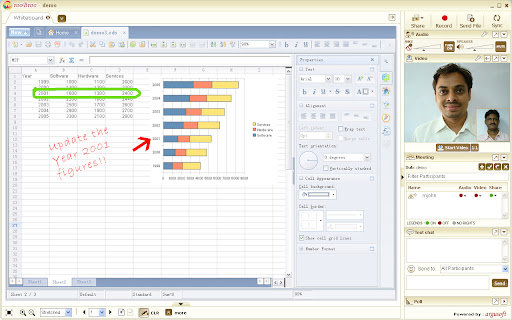
Collaboration Facilitator Extension
Collaboration Facilitator (rooBroo) - Powered by Argusoft
Collaboration Facilitator is an extension for rooBroo - A communication and collaboration platform. To learn more about rooBroo visit http://www.roobroo.com
rooBroo – a next generation interaction tool with unsurpassed ease of use, cost effectiveness, high security and great performance. Its a bundle of quality features that you ever wanted in a conferencing tool. rooBroo makes it easy for corporate professional to meet and present information online to anyone, anytime and anywhere in the world.
rooBroo is 'the best in its class' desktop video conferencing solution available today from ArguSoft. Use rooBroo to engage colleagues and customers with rich content. Don't just talk to your audience; engage them with interactive multimedia experiences including video, animations, and software simulations. Point of presence enables the instant setup of meeting with your online buddy and the built in archiving capability allows for recording entire end-to-end session for viewing on-demand at a later time or simply to maintain a digital record for compliance purposes. Participants can collaborate instantly in an informal, highly interactive manner with shared screens, images, documents, VOIP, and video.
How can rooBroo help you? You can use rooBroo for
# Elearning: Make experts available to all students via. virtual classroom sessions.
# Sales and marketing: ‘Travel less and still reach out to many prospects.
# Service: Provide remote support to ensure less turnaround time.
# Training: Train customers and employees across the globe.
# Health Care: Remote assistance to patients by expert doctors.
# And much more...
Salient Features
* Audio-Video-Text: Communicate & collaborate with meeting attendees using Audio-Video conferencing along with texting.
* Desktop share (View): Broadcast view of your entire desktop or any particular application to attendees and get them involved using annotation tools.
* Drawing Tool: Draw, doodle, highlight, insert picture / graph, instantly on white board. Share snapshot of a spreadsheet, document or for that matter anything on your desktop as a single file.
* Save sessions: The entire meeting can be saved for future multiple references. This can be played back offline.
* Simple UI: Simple and intuitive user interface allows user to use the tool without any training.
* Security: Different algorithms used ensure security even during transmission.
| 分类 | 👥社交 |
| 插件标识 | neigflaheohfodbelpniiccaailljchg |
| 平台 | Chrome |
| 评分 |
☆☆☆☆☆
|
| 评分人数 | |
| 插件主页 | https://chromewebstore.google.com/detail/collaboration-facilitator/neigflaheohfodbelpniiccaailljchg |
| 版本号 | 3.128.4 |
| 大小 | 23.57KiB |
| 官网下载次数 | 54 |
| 下载地址 | |
| 更新时间 | 2015-01-21 00:00:00 |
CRX扩展文件安装方法
第1步: 打开Chrome浏览器的扩展程序
第2步:
在地址栏输入: chrome://extensions/
第3步: 开启右上角的【开发者模式】
第4步: 重启Chrome浏览器 (重要操作)
第5步: 重新打开扩展程序管理界面
第6步: 将下载的crx文件直接拖入页面完成安装
注意:请确保使用最新版本的Chrome浏览器