
join.me for Google Calendar Chrome 插件, crx 扩展下载

Schedule join.me meetings in Google Calendar
Introducing Version 2.0 of join.me for Google Calendar!
With this latest update, join.me users can:
- One-time authorize into their join.me accounts
- Schedule recurring meetings in Google Calendar (Pro/Business)
- Utilize multiple join.me accounts within the extension
- Schedule join.me meetings on alternate calendars (Pro/Business)
- Host and join meetings as a Free, Pro or Business user
Speed, security, and stability improvements have also been made, as well as upgrades to the extension’s look and feel.
Online meetings should be as simple and intuitive as possible.
Scheduling those meetings should be just as easy.
Built for today’s fast-paced, highly mobile workplace, join.me is the instant online meeting app that makes collaboration easier than ever. Powerful yet simple enough for anyone to use, join.me is ideal for ad-hoc meetings, scheduled meetings, formal presentations, face-to-face sessions, or anytime you need to share ideas and get work done fast.
join.me for Google Calendar 2.0
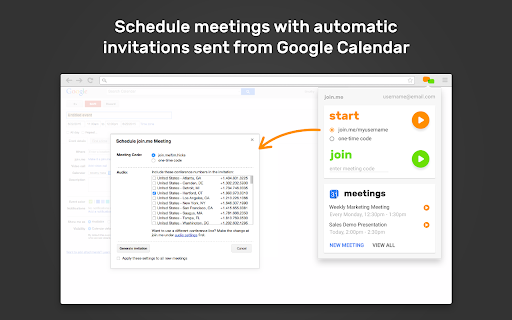
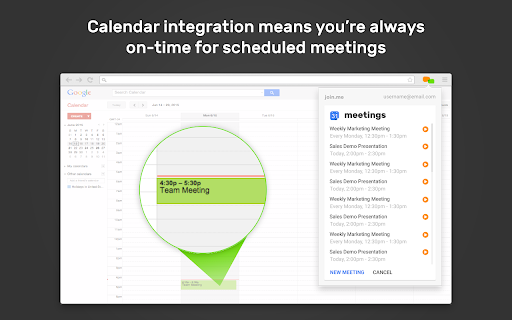
Scheduling an online join.me meeting is simple with Google Calendar. Meeting reservations are booked directly from your Google Calendar account - no additional booking software required.
To schedule a join.me meeting:
1. Start a Google Calendar invite as you normally would
2. Click "Make it a join.me meeting" below the location
3. Select your settings in the popup and click "Generate Invitation"
4. The join.me meeting information is automatically included in the Google Calendar description for attendees. Just click save and send the invite.
With join.me for Google Calendar users get:
- Online meetings for up to 250 participants
- Unlimited audio conferencing
- Unlimited screen sharing
- Presenter swap for all meeting attendees
And so much more - Get the join.me Google Calendar extension now!
Minimum Requirements:
- join.me Free, Trial, Pro, or Business
- Latest join.me desktop app for Windows or Mac
| 分类 | 📝工作流程与规划 |
| 插件标识 | nemahdoihakfniciobefoebllhlobdok |
| 平台 | Chrome |
| 评分 |
☆☆☆☆☆
|
| 评分人数 | |
| 插件主页 | https://chromewebstore.google.com/detail/joinme-for-google-calenda/nemahdoihakfniciobefoebllhlobdok |
| 版本号 | 2.0.1262 |
| 大小 | 11.27MiB |
| 官网下载次数 | 10000 |
| 下载地址 | |
| 更新时间 | 2020-10-14 00:00:00 |
CRX扩展文件安装方法
第1步: 打开Chrome浏览器的扩展程序
第2步:
在地址栏输入: chrome://extensions/
第3步: 开启右上角的【开发者模式】
第4步: 重启Chrome浏览器 (重要操作)
第5步: 重新打开扩展程序管理界面
第6步: 将下载的crx文件直接拖入页面完成安装
注意:请确保使用最新版本的Chrome浏览器