
Form Inspector Chrome 插件, crx 扩展下载
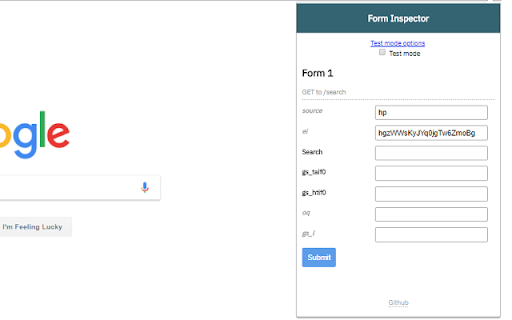
Inspect, modify, and test live forms with ease
Easily inspect, debug, and test live forms on any website.
Form inspector allows you to:
+ Modify input values (including hidden inputs)
+ Submit forms straight from the extension
+ A testing mode that automatically fills in form inputs when opening the extension
+ Custom default test values for quick testing
+ Honeypot avoidance
Test mode makes it easier than ever to perform test submissions on forms.
1. Provide default input values in the Test mode options
2. Activate Test mode by clicking the checkbox
3. Open the extension on any page to autofill forms with your default values
4. Click submit. No more repetitive typing!
| 分类 | 💻开发者工具 |
| 插件标识 | ngbpjbijlmghjooeejfjfmgjfmlkfpbg |
| 平台 | Chrome |
| 评分 |
☆☆☆☆☆
|
| 评分人数 | |
| 插件主页 | https://chromewebstore.google.com/detail/form-inspector/ngbpjbijlmghjooeejfjfmgjfmlkfpbg |
| 版本号 | 8.3 |
| 大小 | 14.67KiB |
| 官网下载次数 | 374 |
| 下载地址 | |
| 更新时间 | 2018-04-24 00:00:00 |
CRX扩展文件安装方法
第1步: 打开Chrome浏览器的扩展程序
第2步:
在地址栏输入: chrome://extensions/
第3步: 开启右上角的【开发者模式】
第4步: 重启Chrome浏览器 (重要操作)
第5步: 重新打开扩展程序管理界面
第6步: 将下载的crx文件直接拖入页面完成安装
注意:请确保使用最新版本的Chrome浏览器