
Export for Trello Chrome 插件, crx 扩展下载
Export Trello Boards to Excel
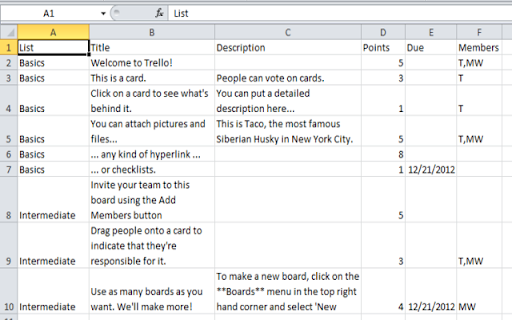
Exports a board to an Excel xlsx file.
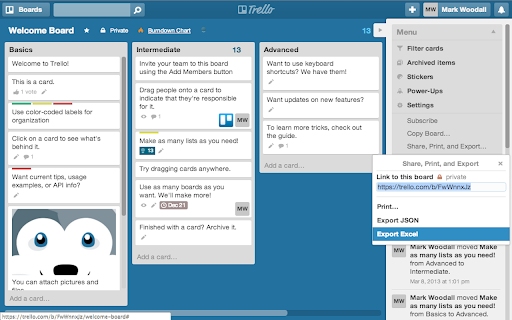
Usage: From a board, Menu > Share, Print, and Export > Export Excel.
Note: Once installed, might take a refresh or two of Trello before it starts to show up.
New in version 1.7:
Added the card URL, so you can quickly get back to a specific card in the export.
Exported Fields:
* List
* Title/Name
* Description
* Points - using format "(1)" in Title field
* Due Date
* Members Initials
* Labels
* Card #
* Card URL
Archived cards are exported to a second tab in the workbook.
| 分类 | 📝工作流程与规划 |
| 插件标识 | nhdelomnagopgaealggpgojkhcafhnin |
| 平台 | Chrome |
| 评分 |
☆☆☆☆☆
|
| 评分人数 | |
| 插件主页 | https://chromewebstore.google.com/detail/export-for-trello/nhdelomnagopgaealggpgojkhcafhnin |
| 版本号 | 0.0.4 |
| 大小 | 114KiB |
| 官网下载次数 | 50000 |
| 下载地址 | |
| 更新时间 | 2015-04-17 00:00:00 |
CRX扩展文件安装方法
第1步: 打开Chrome浏览器的扩展程序
第2步:
在地址栏输入: chrome://extensions/
第3步: 开启右上角的【开发者模式】
第4步: 重启Chrome浏览器 (重要操作)
第5步: 重新打开扩展程序管理界面
第6步: 将下载的crx文件直接拖入页面完成安装
注意:请确保使用最新版本的Chrome浏览器