
Dark Theme Everywhere Chrome 插件, crx 扩展下载
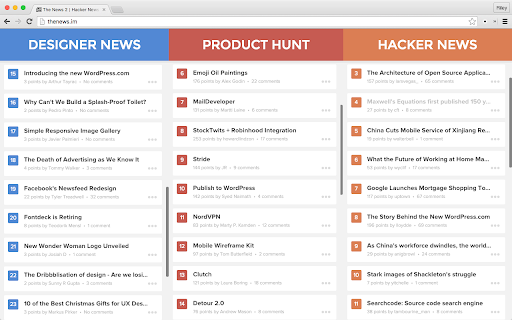
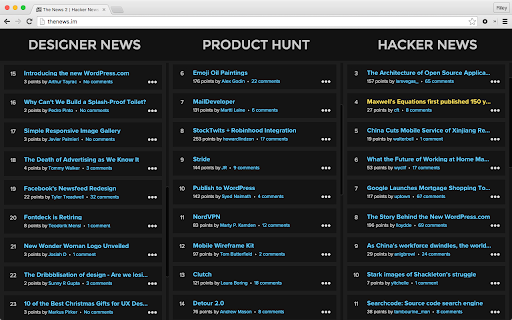
Darkens bright pages for easier night time reading. Unofficial improvement of 'Nicer Inverter'.
**New in Version 6**
Manually toggling a site's theme now adds or removes it from your exceptions list, so you don't need to re-click whenever you refresh!
**New in Version 5**
Subtly darkens photos and media embeds (you can turn this off from the Options page).
**New in Version 4**
Add a list of exceptions from the default theme (eg. "facebook.com").
I was tempted to call this "Nicest Inverter", but it doesn't actually invert anything. It gives you a dark page, no matter what!
Improvements from Nicer Inverter:
● Dark-ifies pages aggressively, so you're much less likely to come across pages with bright patches.
● Dark-ifies pages *by default*, so you don't need to click the extension's button on every page load.
● Allows you to toggle dark styles on and off without reloading the page.
● Optionally darkens photos and media embeds.
There are a lot of inverters out there, and many of them are great. I'm using Dark Reader[1] right now, and honestly, it's better than this for most use cases. BUT! Some pages on the internet are dark by default. When you invert a dark page, it becomes light. AGH MY EYES!
This extension will *always* give you a dark background.
You can change the default theme from "Dark" to "Light" by going to Tools -> Extensions and clicking the "Options" link under Dark Theme Everywhere. You can toggle the theme with a hotkey by going to Tools -> Extensions and clicking the "Keyboard shortcuts" link at the bottom.
Now that your browser is nice and dark-themed, you might notice an annoying white flash between pages. It's a known bug that's being tracked in Issue 1373[2] and Issue 126341[3]. I wrote another extension to reduce the flicker[4], but the problem will exist to some degree until it's fixed in Chromium.
Enjoy! Licensed under MIT.
Links:
[1]: https://chrome.google.com/webstore/detail/dark-reader/eimadpbcbfnmbkopoojfekhnkhdbieeh
[2]: https://code.google.com/p/chromium/issues/detail?id=1373
[3]: https://code.google.com/p/chromium/issues/detail?id=126341
[4]: https://chrome.google.com/webstore/detail/reduce-background-flicker/hdnedegfdlmgbabbgmnjnmmijfjeaiib
| 分类 | ♿无障碍访问 |
| 插件标识 | nibjplbnmmklkfnkpecgbffkifmdbjed |
| 平台 | Chrome |
| 评分 |
☆☆☆☆☆
|
| 评分人数 | |
| 插件主页 | https://chromewebstore.google.com/detail/dark-theme-everywhere/nibjplbnmmklkfnkpecgbffkifmdbjed |
| 版本号 | 4.9.103 |
| 大小 | 1.24MiB |
| 官网下载次数 | 4000 |
| 下载地址 | |
| 更新时间 | 2016-06-30 00:00:00 |
CRX扩展文件安装方法
第1步: 打开Chrome浏览器的扩展程序
第2步:
在地址栏输入: chrome://extensions/
第3步: 开启右上角的【开发者模式】
第4步: 重启Chrome浏览器 (重要操作)
第5步: 重新打开扩展程序管理界面
第6步: 将下载的crx文件直接拖入页面完成安装
注意:请确保使用最新版本的Chrome浏览器