
Cook's Illustrated Exclusive Search Chrome 插件, crx 扩展下载
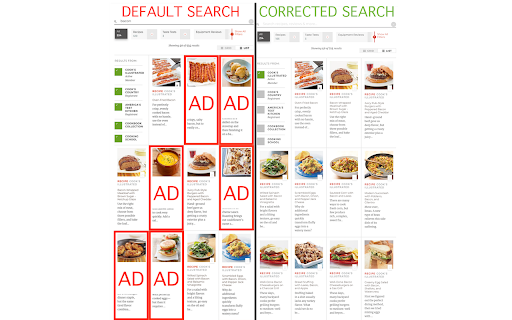
Fixes Cook's Illustrated search to remove advertisements for other network sites
By default, Cook's Illustrated (https://www.cooksillustrated.com) includes search results from all its network sites, even if you do not have a membership to those other sites. These search results are advertisements because the content is locked behind a paywall.
After performing a search it is possible to deselect the other sites manually, then the search results will not include any advertisements for network sites. However, browsing to a recipe and performing a *new* search will reset the selected sites requiring them to be deselected manually, *every single time a search is performed*.
As an example, the search query `bacon` has 40 results on the first page. Of these 40, only 15 results are for Cook's Illustrated Online. That means that **37% of results are valid** and **63% of results are advertisements**.
By default, when the form is submitted with a search term `bacon` the search results page will include results from:
* `cio`, aka "Cook's Illustrated Online"
* `cco`, aka "Cook's Country Online"
* `atk`, aka "America's Test Kitchen"
* `cookbook_collection`, aka "Cookbook Collection"
* `school`, aka "Cooking School"
If you have not paid for subscriptions to all of these sites then the search results will be polluted with advertisements for these network sites.
This extension looks for the `atkGlobalSearch` form and modifies the `action` parameter to `/search?dFR[search_site_list][0]=cio&fR[search_cookbook_collection][0]=false`.
The search result page will then display results only from Cook's Illustrated Online.
The full MIT-licensed source code is available at https://github.com/anothermh/cies.
| 分类 | 🛠️工具 |
| 插件标识 | nidfinggdegnohlahobcpmijobhdejnm |
| 平台 | Chrome |
| 评分 |
☆☆☆☆☆
|
| 评分人数 | |
| 插件主页 | https://chromewebstore.google.com/detail/cooks-illustrated-exclusi/nidfinggdegnohlahobcpmijobhdejnm |
| 版本号 | 0.1.0 |
| 大小 | 7.88MiB |
| 官网下载次数 | 12 |
| 下载地址 | |
| 更新时间 | 2018-12-05 00:00:00 |
CRX扩展文件安装方法
第1步: 打开Chrome浏览器的扩展程序
第2步:
在地址栏输入: chrome://extensions/
第3步: 开启右上角的【开发者模式】
第4步: 重启Chrome浏览器 (重要操作)
第5步: 重新打开扩展程序管理界面
第6步: 将下载的crx文件直接拖入页面完成安装
注意:请确保使用最新版本的Chrome浏览器