
Open in Google Chrome 插件, crx 扩展下载
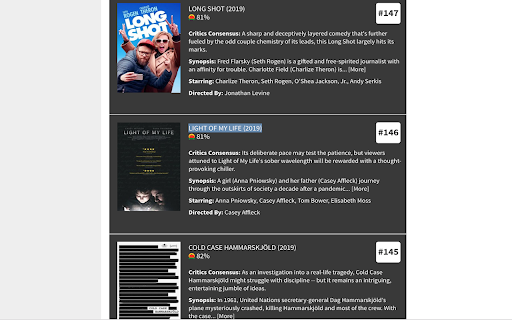
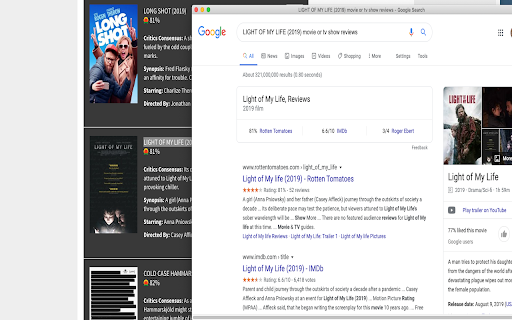
Selp! Streaming help. Select name of the movie or show using the mouse and open it in Google to check reviews or where to watch it
Are you tired of copy pasting the name of the movie or tv show you found on some website on Google to see the rating or where you can watch it?
Well I was, I would spend a lot of time finding what to watch and then I had to open Google in a new tab and copy paste the name of the movie or tv show to check the rating, where to watch (Netflix, Hulu etc). It was frustrating because I would have to copy paste each name over and over again
To help this pain, I created this plugin which is super easy to use
Step # 1: Install the plugin. You will see a red green yellow search icon in your browser
Step # 2: Copy the name of the movie or tv show using the mouse
Step # 3: Click on the Google search icon. This will open the movie/show details in a new window
| 分类 | 🛠️工具 |
| 插件标识 | nikfadenpcoobgehmiihndhmlepgjalb |
| 平台 | Chrome |
| 评分 |
☆☆☆☆☆
|
| 评分人数 | |
| 插件主页 | https://chromewebstore.google.com/detail/open-in-google/nikfadenpcoobgehmiihndhmlepgjalb |
| 版本号 | 1.0.0.47 |
| 大小 | 21.19KiB |
| 官网下载次数 | 315 |
| 下载地址 | |
| 更新时间 | 2020-02-24 00:00:00 |
CRX扩展文件安装方法
第1步: 打开Chrome浏览器的扩展程序
第2步:
在地址栏输入: chrome://extensions/
第3步: 开启右上角的【开发者模式】
第4步: 重启Chrome浏览器 (重要操作)
第5步: 重新打开扩展程序管理界面
第6步: 将下载的crx文件直接拖入页面完成安装
注意:请确保使用最新版本的Chrome浏览器