
Rotate Page in Google Books Chrome 插件, crx 扩展下载
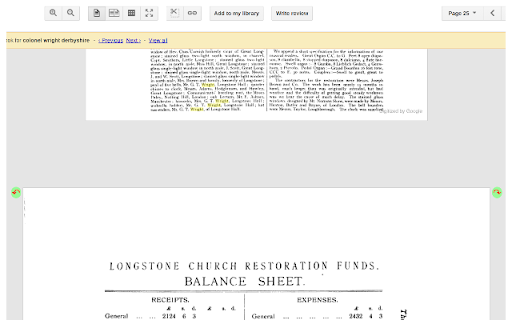
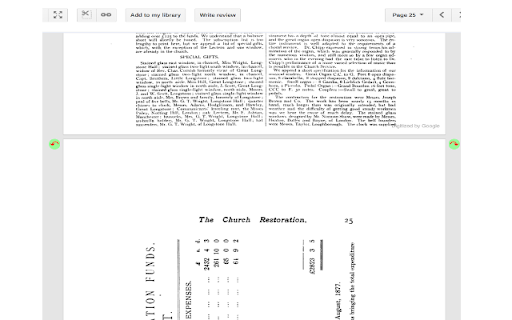
Click on a book page to get arrows in the upper corners for rotating the page in 90 degree increments.
Rotates selected pages in Google Books results.
Some books have pages that are best viewed when rotated by 90 degrees right or left (i.e. clockwise or anti-clockwise). RotateBookPage makes this easy, right in the Google Books display of the book pages.
Step 1: Search for a book that has a page that needs to be rotated. For example: https://books.google.com/books?id=JS4QAAAAYAAJ&pg=PA25
Step 2: Click on the page to be rotated (page 25 in the example). Arrows in green circles ("rotation arrows") are displayed at the top-left and top-right corners of the page.
Step 3a: Click on the rotation arrow in the top-right corner to rotate the page to the right (i.e. clockwise).
Step 3b: Click on the rotation arrow in the top-left corner to rotate the page to the left (i.e. anti-clockwise).
Step 4: Click on the page again (when it isn't rotated) to remove the rotation arrows.
| 分类 | ♿无障碍访问 |
| 插件标识 | njekdcbanhfkdnnfmmbidoacmankeplg |
| 平台 | Chrome |
| 评分 |
☆☆☆☆☆
|
| 评分人数 | |
| 插件主页 | https://chromewebstore.google.com/detail/rotate-page-in-google-boo/njekdcbanhfkdnnfmmbidoacmankeplg |
| 版本号 | 2.19.1 |
| 大小 | 37.49KiB |
| 官网下载次数 | 631 |
| 下载地址 | |
| 更新时间 | 2016-09-24 00:00:00 |
CRX扩展文件安装方法
第1步: 打开Chrome浏览器的扩展程序
第2步:
在地址栏输入: chrome://extensions/
第3步: 开启右上角的【开发者模式】
第4步: 重启Chrome浏览器 (重要操作)
第5步: 重新打开扩展程序管理界面
第6步: 将下载的crx文件直接拖入页面完成安装
注意:请确保使用最新版本的Chrome浏览器